1. Docker로 MongoDB 실행
1) MongoDB 이미지를 바탕으로 컨테이너 실행
Docker Hub - mongo : https://hub.docker.com/_/mongo
- Windows PowerShell
PS C:\Users\admin> mkdir docker-mongodb


    디렉터리: C:\Users\admin


Mode                 LastWriteTime         Length Name
----                 -------------         ------ ----
d-----      2026-05-11  오후 11:18                docker-mongodb


PS C:\Users\admin> cd docker-mongodb
PS C:\Users\admin\docker-mongodb> docker run -d -p 27017:27017 -e MONGO_INITDB_ROOT_USERNAME=root -e MONGO_INITDB_ROOT_PASSWORD=pwd123 -v C:/Users/admin/docker-mongodb/mongodb_data:/data/db mongo
Unable to find image 'mongo:latest' locally
latest: Pulling from library/mongo
22de34182e26: Pull complete
b40150c1c271: Pull complete
ba27587cdb34: Pull complete
0b1842dab2ed: Pull complete
ccce04f560d7: Pull complete
51c17794a12f: Pull complete
6126dc5fffed: Pull complete
f39dec9b5448: Pull complete
0cb1d46d977e: Download complete
bc0f43d24943: Download complete
Digest: sha256:7abfba0d07c9330373f8173981ea4d09cd8a82cdf0e86ccaf7008848d1d24f62
Status: Downloaded newer image for mongo:latest
f3dcd31800cb6344354d92b27283bfce9562318bb04372eaf598989a38276bc9
2) 컨테이너 실행 체크
- Windows PowerShell
PS C:\Users\admin\docker-mongodb> docker ps
CONTAINER ID   IMAGE     COMMAND                  CREATED          STATUS          PORTS                                             NAMES
f3dcd31800cb   mongo     "docker-entrypoint.s…"   55 seconds ago   Up 53 seconds   0.0.0.0:27017->27017/tcp, [::]:27017->27017/tcp   frosty_mirzakhani
3) 컨테이너가 에러 없이 실행되는지 로그 체크
- Windows PowerShell
PS C:\Users\admin\docker-mongodb> docker logs f3dc
{"t":{"$date":"2026-05-11T14:22:54.144+00:00"},"s":"I",  "c":"-",        "id":8991200, "ctx":"main","msg":"Shuffling initializers","attr":{"seed":3927880488}}
about to fork child process, waiting until server is ready for connections.
forked process: 29

{"t":{"$date":"2026-05-11T14:22:54.153+00:00"},"s":"I",  "c":"CONTROL",  "id":20698,   "ctx":"main","msg":"***** SERVER RESTARTED *****"}
{"t":{"$date":"2026-05-11T14:22:54.157+00:00"},"s":"I",  "c":"CONTROL",  "id":97374,   "ctx":"main","msg":"Automatically disabling TLS 1.0 and TLS 1.1, to force-enable TLS 1.1 specify --sslDisabledProtocols 'TLS1_0'; to force-enable TLS 1.0 specify --sslDisabledProtocols 'none'"}
...
{"t":{"$date":"2026-05-11T14:23:01.252+00:00"},"s":"I",  "c":"CONTROL",  "id":23138,   "ctx":"SignalHandler","msg":"Shutting down","attr":{"exitCode":0}}

MongoDB init process complete; ready for start up.

{"t":{"$date":"2026-05-11T14:23:01.680+00:00"},"s":"I",  "c":"-",        "id":8991200, "ctx":"main","msg":"Shuffling initializers","attr":{"seed":1108284154}}
...
{"t":{"$date":"2026-05-11T14:23:09.395+00:00"},"s":"I",  "c":"CONTROL",  "id":8423403, "ctx":"initandlisten","msg":"mongod startup complete","attr":{"Summary of time elapsed":{"Startup from clean shutdown?":true,"Statistics":{"setUpPeriodicRunnerMillis":0,"setUpOCSPMillis":0,"setUpTransportLayerMillis":0,"initSyncCrashRecoveryMillis":0,"createLockFileMillis":0,"getStorageEngineMetadataMillis":0,"validateMetadataMillis":0,"createStorageEngineMillis":7667,"writePIDMillis":3,"initializeFCVForIndexMillis":5,"dropAbandonedIdentsMillis":0,"standaloneClusterParamsMillis":0,"userAndRolesGraphMillis":0,"createSystemUsersIndexMillis":0,"waitForMajorityServiceMillis":0,"startUpReplCoordMillis":2,"recoverChangeStreamMillis":0,"logStartupOptionsMillis":0,"startUpTransportLayerMillis":0,"initAndListenTotalMillis":7705}}}}
{"t":{"$date":"2026-05-11T14:24:09.376+00:00"},"s":"I",  "c":"WTCHKPT",  "id":22430,   "ctx":"Checkpointer","msg":"WiredTiger message","attr":{"message":{"ts_sec":1778509449,"ts_usec":376686,"thread":"1:0x72cfded2d6c0","session_name":"WT_SESSION.checkpoint","category":"WT_VERB_CHECKPOINT_PROGRESS","log_id":1000000,"category_id":7,"verbose_level":"INFO","verbose_level_id":0,"msg":"saving checkpoint snapshot min: 3, snapshot max: 3 snapshot count: 0, oldest timestamp: (0, 0) , meta checkpoint timestamp: (0, 0) base write gen: 7"}}}

What's next:
    View and search logs for all containers in one place
    with Docker Desktop's Logs view. docker-desktop://dashboard/logs
4) MongoDB 컨테이너 접속
- Windows PowerShell
PS C:\Users\admin\docker-mongodb> docker exec -it f3dc bash
root@f3dcd31800cb:/# ls
bin  boot  data  dev  docker-entrypoint-initdb.d  etc  home  js-yaml.js  lib  lib64  media  mnt  opt  proc  root  run  sbin  srv  sys  tmp  usr  var
root@f3dcd31800cb:/# pwd
/
5) 컨테이너에서 MongoDB에 접근
- Windows PowerShell
root@f3dcd31800cb:/# mongosh
Current Mongosh Log ID: 6a01e748d3a6b8bbb444ba88
Connecting to:          mongodb://127.0.0.1:27017/?directConnection=true&serverSelectionTimeoutMS=2000&appName=mongosh+2.8.2
Using MongoDB:          undefined
Using Mongosh:          2.8.2

For mongosh info see: https://www.mongodb.com/docs/mongodb-shell/


To help improve our products, anonymous usage data is collected and sent to MongoDB periodically (https://www.mongodb.com/legal/privacy-policy).
You can opt-out by running the disableTelemetry() command.

test> exit
root@f3dcd31800cb:/# exit
exit

What's next:
    Try Docker Debug for seamless, persistent debugging tools in any container or image → docker debug f3dc
    Learn more at https://docs.docker.com/go/debug-cli/
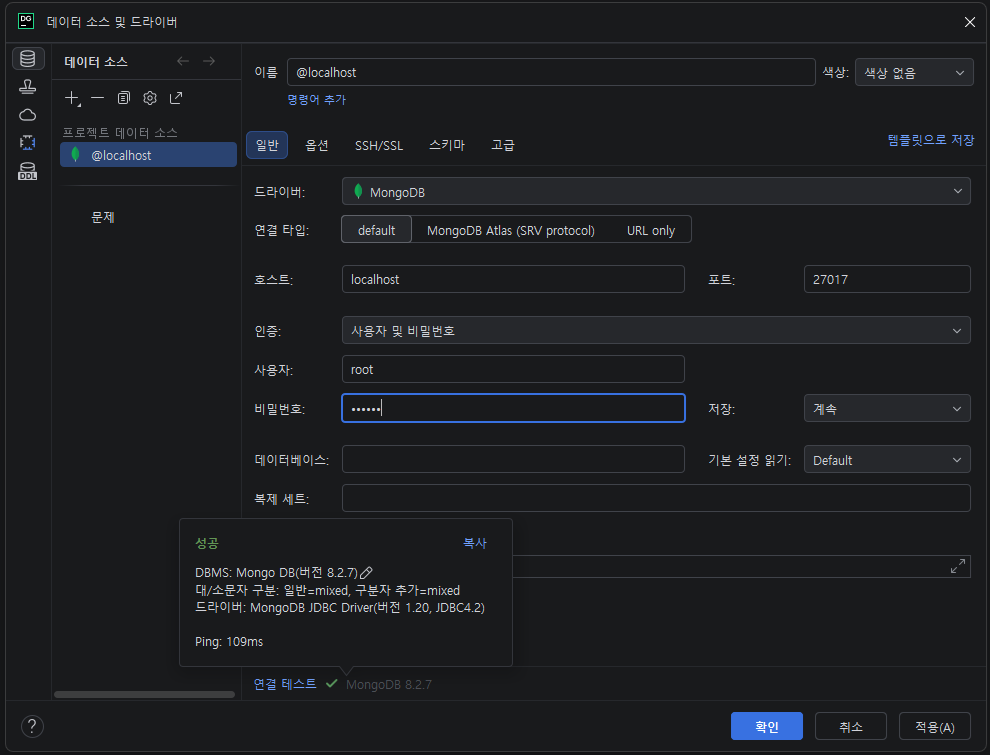
6) DataGrip 에 연결
데이터베이스 탐색기 우클릭 > 새로 작성 > 데이터 소스 > MongoDB > MongoDB
호스트: localhost
사용자: root
비밀번호: pwd123
연결 테스트시 드라이버 파일이 다운로드 되지 않았다고 하면, "드라이버 파일 다운로드" 버튼 클릭하여 다운로드 진행
연결 테스트 성공 후, "적용" 버튼 클릭 후 "확인" 버튼 클릭
7) MongoDB 데이터가 볼륨에 저장되는지 확인
- Windows PowerShell
PS C:\Users\admin\docker-mongodb> ls


    디렉터리: C:\Users\admin\docker-mongodb


Mode                 LastWriteTime         Length Name
----                 -------------         ------ ----
da----      2026-05-11  오후 11:33                mongodb_data


PS C:\Users\admin\docker-mongodb> cd mongodb_data
PS C:\Users\admin\docker-mongodb\mongodb_data> ls


    디렉터리: C:\Users\admin\docker-mongodb\mongodb_data


Mode                 LastWriteTime         Length Name
----                 -------------         ------ ----
d-----      2026-05-11  오후 11:22                .mongodb
d-----      2026-05-11  오후 11:34                diagnostic.data
d-----      2026-05-11  오후 11:23                journal
d-----      2026-05-11  오후 11:23                _tmp
-a----      2026-05-11  오후 11:33             20 .bash_history
-a----      2026-05-11  오후 11:23          20480 collection-2c4a0ab5-61ce-4119-a342-0687fefb3ed5.wt
-a----      2026-05-11  오후 11:33          20480 collection-60e909e4-9f79-425b-9c9e-a5cd6dbf3beb.wt
-a----      2026-05-11  오후 11:24          36864 collection-a283fa47-172c-4317-b432-0cdaadeef8cf.wt
-a----      2026-05-11  오후 11:27          20480 collection-ac610654-4e9b-4e49-a37f-b9c0f6aab23e.wt
-a----      2026-05-11  오후 11:24          36864 index-2ed00c5b-b4e6-4ce8-a6ba-621368584c0b.wt
-a----      2026-05-11  오후 11:22          20480 index-73284ebf-6c0b-44bb-8c54-8d74ba7bf6d2.wt
-a----      2026-05-11  오후 11:33          20480 index-7ce46ca8-4fb9-4ecb-bf10-94382e2f19ea.wt
-a----      2026-05-11  오후 11:33          20480 index-cad1e094-3a59-48ee-832b-d08044400044.wt
-a----      2026-05-11  오후 11:23          20480 index-ccf1544f-82ad-4073-9059-47f4bba72eea.wt
-a----      2026-05-11  오후 11:27          20480 index-de154c54-fb8b-4bf3-bbda-b544bdb684c3.wt
-a----      2026-05-11  오후 11:23              2 mongod.lock
-a----      2026-05-11  오후 11:34          32768 sizeStorer.wt
-a----      2026-05-11  오후 11:22            114 storage.bson
-a----      2026-05-11  오후 11:22             50 WiredTiger
-a----      2026-05-11  오후 11:22             21 WiredTiger.lock
-a----      2026-05-11  오후 11:34           1469 WiredTiger.turtle
-a----      2026-05-11  오후 11:34          86016 WiredTiger.wt
-a----      2026-05-11  오후 11:23           4096 WiredTigerHS.wt
-a----      2026-05-11  오후 11:23          20480 _mdb_catalog.wt

비전공자도 이해할 수 있는 Docker 입문/실전| JSCODE 박재성 - 인프런 강의
현재 평점 4.9점 수강생 14,459명인 강의를 만나보세요. 비전공자 입장에서도 쉽게 이해할 수 있고, 실전에서 바로 적용 가능한 Docker 입문/실전 강의를 만들어봤습니다! Docker 기본 개념, Spring Boot를
www.inflearn.com
'강의 실습 > 비전공자도 이해할 수 있는 Docker 입문 실전' 카테고리의 다른 글
| FROM : 베이스 이미지 생성 (0) | 2026.05.12 |
|---|---|
| Dockerfile이란? (0) | 2026.05.12 |
| [실습] Docker로 PostgreSQL 실행시켜보기 (0) | 2026.05.10 |
| [실습] Docker로 MySQL 실행시켜보기 - 4 (0) | 2026.05.09 |
| [실습] Docker로 MySQL 실행시켜보기 - 3 (0) | 2026.05.09 |

댓글