1. Docker로 PostgreSQL 실행
1) PostgreSQL 이미지를 바탕으로 컨테이너 실행
Docker Hub - postgres : https://hub.docker.com/_/postgres
postgres - Official Image | Docker Hub
Note: the description for this image is longer than the Hub length limit of 25000, so has been trimmed. The full description can be found at https://github.com/docker-library/docs/tree/master/postgres/README.md. See also docker/hub-feedback#238 and d
hub.docker.com
- Windows PowerShell
PS C:\Users\admin> mkdir docker-postgresql


    디렉터리: C:\Users\admin


Mode                 LastWriteTime         Length Name
----                 -------------         ------ ----
d-----      2026-05-10  오후 10:30                docker-postgresql


PS C:\Users\admin> cd docker-postgresql
PS C:\Users\admin\docker-postgresql> docker run -d -p 5432:5432 -e POSTGRES_PASSWORD=pwd123 -v C:/Users/admin/docker-postgresql/postgresql_data:/var/lib/postgresql/18/docker postgres
Unable to find image 'postgres:latest' locally
latest: Pulling from library/postgres
479918537f59: Pull complete
6e38a999e99d: Pull complete
d9019a56de83: Pull complete
57fb71246055: Pull complete
ef9aa5783c64: Pull complete
631436d0d0b7: Pull complete
2c71b11837a2: Pull complete
0337286b2934: Pull complete
81a21d8601fa: Pull complete
c52cb585fd05: Pull complete
31e4e3208450: Pull complete
550df04ae070: Pull complete
7572aa056bba: Pull complete
934026d9e7a5: Download complete
771ff4140da5: Download complete
Digest: sha256:c5bd032fb659503bf121faf5cea5894dcfece30286a3db59e3c060f3e9f60cb0
Status: Downloaded newer image for postgres:latest
da53efd1278576855182419fd52f5cb6afd49488988b9e9add038cbcbd43397f
postgres:latest 버전 ENV PGDATA=/var/lib/postgresql/18/docker : https://hub.docker.com/layers/library/postgres/latest/images/sha256-b0648be764db36ab4f78e105764c6919bc2da15b1e98cac8155707e461492a35
Image Layer Details - postgres:latest
hub.docker.com
# PostgreSQL 17 and below
$ docker run -d -p 5432:5432 -e POSTGRES_PASSWORD=pwd123 -v C:/Users/admin/docker-postgresql/postgresql_data:/var/lib/postgresql/data postgres
# PostgreSQL 18 and above
$ docker run -d -p 5432:5432 -e POSTGRES_PASSWORD=pwd123 -v C:/Users/admin/docker-postgresql/postgresql_data:/var/lib/postgresql/18/docker postgres
* [보충 자료] Docker로 PostgreSQL 실행시켜보기
docker 최신 버전 PGDATA 경로 설정 업데이트 소식 공유 : https://inf.run/54Ufs
docker 최신 버전 PGDATA 경로 설정 업데이트 소식 공유 - 인프런 | 커뮤니티 질문&답변
누구나 함께하는 인프런 커뮤니티. 모르면 묻고, 해답을 찾아보세요.
www.inflearn.com
2) 컨테이너 실행 체크
- Windows PowerShell
PS C:\Users\admin\docker-postgresql> docker ps
CONTAINER ID   IMAGE      COMMAND                  CREATED         STATUS         PORTS                                         NAMES
da53efd12785   postgres   "docker-entrypoint.s…"   8 seconds ago   Up 6 seconds   0.0.0.0:5432->5432/tcp, [::]:5432->5432/tcp   admiring_satoshi
3) 컨테이너가 에러 없이 실행되는지 로그 체크
- Windows PowerShell
PS C:\Users\admin\docker-postgresql> docker logs da53
The files belonging to this database system will be owned by user "postgres".
This user must also own the server process.

The database cluster will be initialized with locale "en_US.utf8".
The default database encoding has accordingly been set to "UTF8".
The default text search configuration will be set to "english".

Data page checksums are enabled.

fixing permissions on existing directory /var/lib/postgresql/18/docker ... ok
creating subdirectories ... ok
selecting dynamic shared memory implementation ... posix
selecting default "max_connections" ... 100
selecting default "shared_buffers" ... 128MB
selecting default time zone ... Etc/UTC
creating configuration files ... ok
running bootstrap script ... ok
performing post-bootstrap initialization ... ok
syncing data to disk ... ok


Success. You can now start the database server using:

    pg_ctl -D /var/lib/postgresql/18/docker -l logfile start

initdb: warning: enabling "trust" authentication for local connections
initdb: hint: You can change this by editing pg_hba.conf or using the option -A, or --auth-local and --auth-host, the next time you run initdb.
waiting for server to start....2026-05-10 13:39:31.213 UTC [53] LOG:  starting PostgreSQL 18.3 (Debian 18.3-1.pgdg13+1) on x86_64-pc-linux-gnu, compiled by gcc (Debian 14.2.0-19) 14.2.0, 64-bit
2026-05-10 13:39:31.218 UTC [53] LOG:  listening on Unix socket "/var/run/postgresql/.s.PGSQL.5432"
2026-05-10 13:39:31.251 UTC [59] LOG:  database system was shut down at 2026-05-10 13:39:27 UTC
2026-05-10 13:39:31.284 UTC [53] LOG:  database system is ready to accept connections
 done
server started

/usr/local/bin/docker-entrypoint.sh: ignoring /docker-entrypoint-initdb.d/*

waiting for server to shut down...2026-05-10 13:39:31.487 UTC [53] LOG:  received fast shutdown request
2026-05-10 13:39:31.494 UTC [53] LOG:  aborting any active transactions
.2026-05-10 13:39:31.502 UTC [53] LOG:  background worker "logical replication launcher" (PID 62) exited with exit code 1
2026-05-10 13:39:31.502 UTC [57] LOG:  shutting down
2026-05-10 13:39:31.508 UTC [57] LOG:  checkpoint starting: shutdown immediate
2026-05-10 13:39:31.963 UTC [57] LOG:  checkpoint complete: wrote 0 buffers (0.0%), wrote 3 SLRU buffers; 0 WAL file(s) added, 0 removed, 0 recycled; write=0.018 s, sync=0.008 s, total=0.461 s; sync files=2, longest=0.004 s, average=0.004 s; distance=0 kB, estimate=0 kB; lsn=0/175F8E0, redo lsn=0/175F8E0
2026-05-10 13:39:31.991 UTC [53] LOG:  database system is shut down
 done
server stopped

PostgreSQL init process complete; ready for start up.

2026-05-10 13:39:32.066 UTC [1] LOG:  starting PostgreSQL 18.3 (Debian 18.3-1.pgdg13+1) on x86_64-pc-linux-gnu, compiled by gcc (Debian 14.2.0-19) 14.2.0, 64-bit
2026-05-10 13:39:32.066 UTC [1] LOG:  listening on IPv4 address "0.0.0.0", port 5432
2026-05-10 13:39:32.066 UTC [1] LOG:  listening on IPv6 address "::", port 5432
2026-05-10 13:39:32.076 UTC [1] LOG:  listening on Unix socket "/var/run/postgresql/.s.PGSQL.5432"
2026-05-10 13:39:32.101 UTC [73] LOG:  database system was shut down at 2026-05-10 13:39:31 UTC
2026-05-10 13:39:32.125 UTC [1] LOG:  database system is ready to accept connections

What's next:
    View and search logs for all containers in one place
    with Docker Desktop's Logs view. docker-desktop://dashboard/logs
4) PostgreSQL 컨테이너 접속
- Windows PowerShell
PS C:\Users\admin\docker-postgresql> docker exec -it da53 bash
root@da53efd12785:/# ls
bin  boot  dev  docker-entrypoint-initdb.d  etc  home  lib  lib64  media  mnt  opt  proc  root  run  sbin  srv  sys  tmp  usr  var
root@da53efd12785:/# pwd
/
root@da53efd12785:/# exit
exit

What's next:
    Try Docker Debug for seamless, persistent debugging tools in any container or image → docker debug da53
    Learn more at https://docs.docker.com/go/debug-cli/
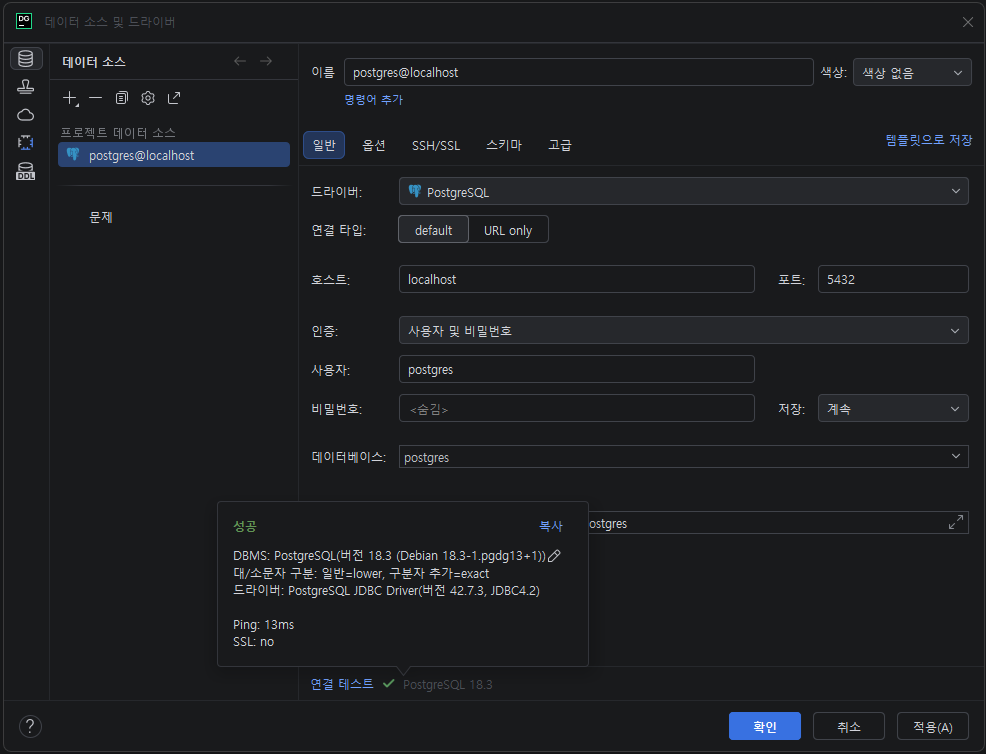
5) DataGrip 에 연결
데이터베이스 탐색기 우클릭 > 새로 작성 > 데이터 소스 > PostgreSQL > PostgreSQL
호스트: localhost
사용자: postgres
비밀번호: pwd123
연결 테스트시 드라이버 파일이 다운로드 되지 않았다고 하면, "드라이버 파일 다운로드" 버튼 클릭하여 다운로드 진행
연결 테스트 성공 후, "적용" 버튼 클릭 후 "확인" 버튼 클릭
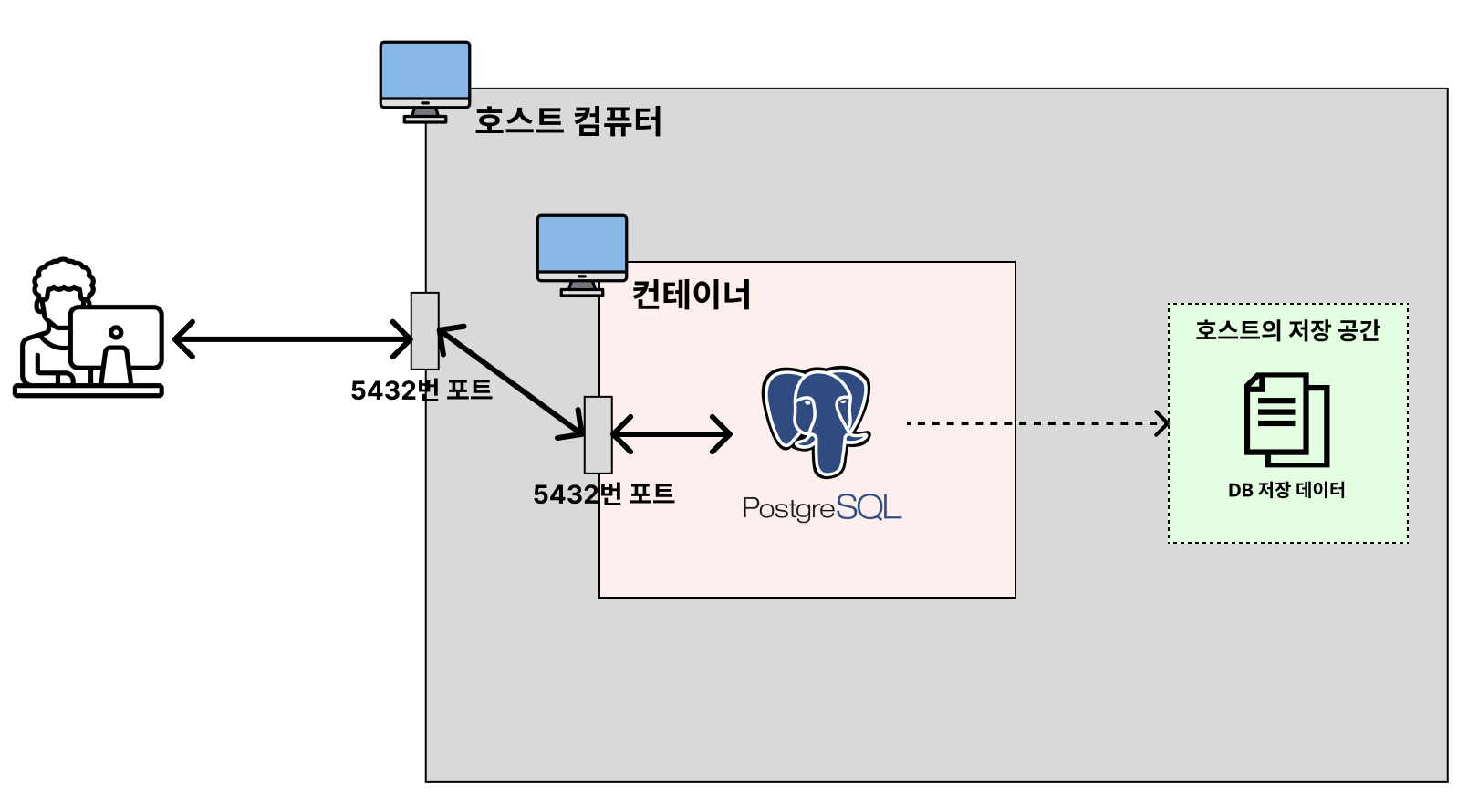
6) PostgreSQL 데이터가 볼륨에 저장되는지 확인
- Windows PowerShell
PS C:\Users\admin\docker-postgresql> ls


    디렉터리: C:\Users\admin\docker-postgresql


Mode                 LastWriteTime         Length Name
----                 -------------         ------ ----
da----      2026-05-10  오후 10:39                postgresql_data


PS C:\Users\admin\docker-postgresql> cd postgresql_data
PS C:\Users\admin\docker-postgresql\postgresql_data> ls


    디렉터리: C:\Users\admin\docker-postgresql\postgresql_data


Mode                 LastWriteTime         Length Name
----                 -------------         ------ ----
d-----      2026-05-10  오후 10:39                base
d-----      2026-05-10  오후 10:42                global
d-----      2026-05-10  오후 10:39                pg_commit_ts
d-----      2026-05-10  오후 10:39                pg_dynshmem
d-----      2026-05-10  오후 10:44                pg_logical
d-----      2026-05-10  오후 10:39                pg_multixact
d-----      2026-05-10  오후 10:39                pg_notify
d-----      2026-05-10  오후 10:39                pg_replslot
d-----      2026-05-10  오후 10:39                pg_serial
d-----      2026-05-10  오후 10:39                pg_snapshots
d-----      2026-05-10  오후 10:39                pg_stat
d-----      2026-05-10  오후 10:39                pg_stat_tmp
d-----      2026-05-10  오후 10:39                pg_subtrans
d-----      2026-05-10  오후 10:39                pg_tblspc
d-----      2026-05-10  오후 10:39                pg_twophase
d-----      2026-05-10  오후 10:39                pg_wal
d-----      2026-05-10  오후 10:39                pg_xact
-a----      2026-05-10  오후 10:39           5753 pg_hba.conf
-a----      2026-05-10  오후 10:39           2681 pg_ident.conf
-a----      2026-05-10  오후 10:39              3 PG_VERSION
-a----      2026-05-10  오후 10:39             88 postgresql.auto.conf
-a----      2026-05-10  오후 10:39          32557 postgresql.conf
-a----      2026-05-10  오후 10:39             36 postmaster.opts
-a----      2026-05-10  오후 10:39             99 postmaster.pid
비전공자도 이해할 수 있는 Docker 입문/실전| JSCODE 박재성 - 인프런 강의
현재 평점 4.9점 수강생 14,455명인 강의를 만나보세요. 비전공자 입장에서도 쉽게 이해할 수 있고, 실전에서 바로 적용 가능한 Docker 입문/실전 강의를 만들어봤습니다! Docker 기본 개념, Spring Boot를
www.inflearn.com
'강의 실습 > 비전공자도 이해할 수 있는 Docker 입문 실전' 카테고리의 다른 글
| Dockerfile이란? (0) | 2026.05.12 |
|---|---|
| [실습] Docker로 MongoDB 실행시켜보기 (0) | 2026.05.11 |
| [실습] Docker로 MySQL 실행시켜보기 - 4 (0) | 2026.05.09 |
| [실습] Docker로 MySQL 실행시켜보기 - 3 (0) | 2026.05.09 |
| [실습] Docker로 MySQL 실행시켜보기 - 2 (0) | 2026.05.08 |


댓글