먼저 컨테이너 중단 후 삭제, 이미지도 삭제
- Windows PowerShell
PS C:\Users\admin> docker ps -al
CONTAINER ID   IMAGE     COMMAND                  CREATED        STATUS    PORTS     NAMES
0558aa0a29a7   mysql     "docker-entrypoint.s…"   23 hours ago   Created             eager_ardinghelli
PS C:\Users\admin> docker rm 0558
0558
PS C:\Users\admin> docker ps -a
CONTAINER ID   IMAGE     COMMAND                  CREATED        STATUS                       PORTS     NAMES
ebe6f5e2b738   nginx     "/docker-entrypoint.…"   23 hours ago   Exited (255) 7 minutes ago   80/tcp    busy_boyd
d8b8a89f1e1d   nginx     "/docker-entrypoint.…"   2 days ago     Exited (0) 2 days ago                  webserver
PS C:\Users\admin> docker rm ebe6
ebe6
PS C:\Users\admin> docker rm d8b8
d8b8
PS C:\Users\admin> docker image ls
                                                                                                                                                                                             i Info →   U  In Use
IMAGE          ID             DISK USAGE   CONTENT SIZE   EXTRA
mysql:latest   c9e48b0c008f        1.3GB          290MB
nginx:latest   6e23479198b9        177MB         2.86MB
PS C:\Users\admin> docker image rm c9e4
Untagged: mysql:latest
Deleted: sha256:c9e48b0c008f1936d4139d1c0dcd5950a9dbe57d4d40f383013cde432fa6d6aa
PS C:\Users\admin> docker image rm 6e23
Untagged: nginx:latest
Deleted: sha256:6e23479198b998e5e25921dff8455837c7636a67111a04a635cf1bb363d199dc
PS C:\Users\admin> docker image ls
                                                                                                                                                                                             i Info →   U  In Use
IMAGE   ID             DISK USAGE   CONTENT SIZE   EXTRA
1. 컨테이너 생성 + 실행
# docker run 이미지명:태그명 : 이미지를 바탕으로 컨테이너를 생성한 뒤 실행
다운받은 이미지가 없다면, Docker Hub 에서 이미지를 다운로드 받아(docker pull) 컨테이너 생성 후 실행
Docker Hub 에서 새롭게 갱신된 이미지를 다운받고 싶다면, 먼저 docker pull 명령어를 활용한다.
이미지를 바탕으로 컨테이너를 실행시키고 싶을 때, 이 명령어 자주 사용
- Windows PowerShell
PS C:\Users\admin> docker run nginx # 포그라운드에서 실행 (추가적인 명령어 조작을 할 수가 없음)
Unable to find image 'nginx:latest' locally
latest: Pulling from library/nginx
801a1ad15b4e: Pull complete
ff048f1f2159: Pull complete
677c63196868: Pull complete
ce776bbcda0d: Pull complete
4677c2a9a3d4: Pull complete
3531af2bc2a9: Pull complete
85c66128325a: Pull complete
54c38c75806e: Download complete
69989ccd189b: Download complete
Digest: sha256:6e23479198b998e5e25921dff8455837c7636a67111a04a635cf1bb363d199dc
Status: Downloaded newer image for nginx:latest
/docker-entrypoint.sh: /docker-entrypoint.d/ is not empty, will attempt to perform configuration
/docker-entrypoint.sh: Looking for shell scripts in /docker-entrypoint.d/
/docker-entrypoint.sh: Launching /docker-entrypoint.d/10-listen-on-ipv6-by-default.sh
10-listen-on-ipv6-by-default.sh: info: Getting the checksum of /etc/nginx/conf.d/default.conf
10-listen-on-ipv6-by-default.sh: info: Enabled listen on IPv6 in /etc/nginx/conf.d/default.conf
/docker-entrypoint.sh: Sourcing /docker-entrypoint.d/15-local-resolvers.envsh
/docker-entrypoint.sh: Launching /docker-entrypoint.d/20-envsubst-on-templates.sh
/docker-entrypoint.sh: Launching /docker-entrypoint.d/30-tune-worker-processes.sh
/docker-entrypoint.sh: Configuration complete; ready for start up
2026/05/01 14:11:25 [notice] 1#1: using the "epoll" event method
2026/05/01 14:11:25 [notice] 1#1: nginx/1.29.8
2026/05/01 14:11:25 [notice] 1#1: built by gcc 14.2.0 (Debian 14.2.0-19)
2026/05/01 14:11:25 [notice] 1#1: OS: Linux 6.6.87.2-microsoft-standard-WSL2
2026/05/01 14:11:25 [notice] 1#1: getrlimit(RLIMIT_NOFILE): 1048576:1048576
2026/05/01 14:11:25 [notice] 1#1: start worker processes
2026/05/01 14:11:25 [notice] 1#1: start worker process 29
2026/05/01 14:11:25 [notice] 1#1: start worker process 30
2026/05/01 14:11:25 [notice] 1#1: start worker process 31
2026/05/01 14:11:25 [notice] 1#1: start worker process 32
2026/05/01 14:11:25 [notice] 1#1: start worker process 33
2026/05/01 14:11:25 [notice] 1#1: start worker process 34
2026/05/01 14:11:25 [notice] 1#1: start worker process 35
2026/05/01 14:11:25 [notice] 1#1: start worker process 36
2026/05/01 14:11:25 [notice] 1#1: start worker process 37
2026/05/01 14:11:25 [notice] 1#1: start worker process 38
2026/05/01 14:11:25 [notice] 1#1: start worker process 39
2026/05/01 14:11:25 [notice] 1#1: start worker process 40
2026/05/01 14:11:25 [notice] 1#1: start worker process 41
2026/05/01 14:11:25 [notice] 1#1: start worker process 42
2026/05/01 14:11:25 [notice] 1#1: start worker process 43
2026/05/01 14:11:25 [notice] 1#1: start worker process 44
2026/05/01 14:11:25 [notice] 1#1: start worker process 45
2026/05/01 14:11:25 [notice] 1#1: start worker process 46
2026/05/01 14:11:25 [notice] 1#1: start worker process 47
2026/05/01 14:11:25 [notice] 1#1: start worker process 48
# Ctrl + C로 종료할 수 있음
2026/05/01 14:16:16 [notice] 1#1: signal 2 (SIGINT) received, exiting
2026/05/01 14:16:16 [notice] 29#29: exiting
2026/05/01 14:16:16 [notice] 31#31: exiting
2026/05/01 14:16:16 [notice] 30#30: exiting
2026/05/01 14:16:16 [notice] 29#29: exit
2026/05/01 14:16:16 [notice] 31#31: exit
2026/05/01 14:16:16 [notice] 30#30: exit
2026/05/01 14:16:16 [notice] 36#36: exiting
2026/05/01 14:16:16 [notice] 45#45: exiting
2026/05/01 14:16:16 [notice] 36#36: exit
2026/05/01 14:16:16 [notice] 45#45: exit
2026/05/01 14:16:16 [notice] 47#47: exiting
2026/05/01 14:16:16 [notice] 47#47: exit
2026/05/01 14:16:16 [notice] 46#46: exiting
2026/05/01 14:16:16 [notice] 32#32: exiting
2026/05/01 14:16:16 [notice] 37#37: exiting
2026/05/01 14:16:16 [notice] 46#46: exit
2026/05/01 14:16:16 [notice] 32#32: exit
2026/05/01 14:16:16 [notice] 42#42: exiting
2026/05/01 14:16:16 [notice] 37#37: exit
2026/05/01 14:16:16 [notice] 42#42: exit
2026/05/01 14:16:16 [notice] 33#33: exiting
2026/05/01 14:16:16 [notice] 44#44: exiting
2026/05/01 14:16:16 [notice] 33#33: exit
2026/05/01 14:16:16 [notice] 44#44: exit
2026/05/01 14:16:16 [notice] 48#48: exiting
2026/05/01 14:16:16 [notice] 48#48: exit
2026/05/01 14:16:16 [notice] 34#34: exiting
2026/05/01 14:16:16 [notice] 35#35: exiting
2026/05/01 14:16:16 [notice] 34#34: exit
2026/05/01 14:16:16 [notice] 35#35: exit
2026/05/01 14:16:16 [notice] 38#38: exiting
2026/05/01 14:16:16 [notice] 38#38: exit
2026/05/01 14:16:16 [notice] 39#39: exiting
2026/05/01 14:16:16 [notice] 39#39: exit
2026/05/01 14:16:16 [notice] 40#40: exiting
2026/05/01 14:16:16 [notice] 41#41: exiting
2026/05/01 14:16:16 [notice] 43#43: exiting
2026/05/01 14:16:16 [notice] 40#40: exit
2026/05/01 14:16:16 [notice] 41#41: exit
2026/05/01 14:16:16 [notice] 43#43: exit
2026/05/01 14:16:16 [notice] 1#1: signal 17 (SIGCHLD) received from 29
2026/05/01 14:16:16 [notice] 1#1: worker process 29 exited with code 0
2026/05/01 14:16:16 [notice] 1#1: signal 29 (SIGIO) received
2026/05/01 14:16:16 [notice] 1#1: signal 17 (SIGCHLD) received from 35
2026/05/01 14:16:16 [notice] 1#1: worker process 35 exited with code 0
2026/05/01 14:16:16 [notice] 1#1: signal 29 (SIGIO) received
2026/05/01 14:16:17 [notice] 1#1: signal 17 (SIGCHLD) received from 41
2026/05/01 14:16:17 [notice] 1#1: worker process 31 exited with code 0
2026/05/01 14:16:17 [notice] 1#1: worker process 38 exited with code 0
2026/05/01 14:16:17 [notice] 1#1: worker process 41 exited with code 0
2026/05/01 14:16:17 [notice] 1#1: worker process 43 exited with code 0
2026/05/01 14:16:17 [notice] 1#1: worker process 47 exited with code 0
2026/05/01 14:16:17 [notice] 1#1: signal 29 (SIGIO) received
2026/05/01 14:16:17 [notice] 1#1: signal 17 (SIGCHLD) received from 40
2026/05/01 14:16:17 [notice] 1#1: worker process 30 exited with code 0
2026/05/01 14:16:17 [notice] 1#1: worker process 34 exited with code 0
2026/05/01 14:16:17 [notice] 1#1: worker process 36 exited with code 0
2026/05/01 14:16:17 [notice] 1#1: worker process 37 exited with code 0
2026/05/01 14:16:17 [notice] 1#1: worker process 40 exited with code 0
2026/05/01 14:16:17 [notice] 1#1: worker process 42 exited with code 0
2026/05/01 14:16:17 [notice] 1#1: worker process 45 exited with code 0
2026/05/01 14:16:17 [notice] 1#1: worker process 48 exited with code 0
2026/05/01 14:16:17 [notice] 1#1: signal 29 (SIGIO) received
2026/05/01 14:16:17 [notice] 1#1: signal 17 (SIGCHLD) received from 39
2026/05/01 14:16:17 [notice] 1#1: worker process 39 exited with code 0
2026/05/01 14:16:17 [notice] 1#1: signal 29 (SIGIO) received
2026/05/01 14:16:17 [notice] 1#1: signal 17 (SIGCHLD) received from 32
2026/05/01 14:16:17 [notice] 1#1: worker process 32 exited with code 0
2026/05/01 14:16:17 [notice] 1#1: signal 29 (SIGIO) received
2026/05/01 14:16:17 [notice] 1#1: signal 17 (SIGCHLD) received from 44
2026/05/01 14:16:17 [notice] 1#1: worker process 44 exited with code 0
2026/05/01 14:16:17 [notice] 1#1: worker process 46 exited with code 0
2026/05/01 14:16:17 [notice] 1#1: signal 29 (SIGIO) received
2026/05/01 14:16:17 [notice] 1#1: signal 17 (SIGCHLD) received from 33
2026/05/01 14:16:17 [notice] 1#1: worker process 33 exited with code 0
2026/05/01 14:16:17 [notice] 1#1: exit
1) 컨테이너를 백그라운드에서 실행
# docker run -d 이미지명:태그명 : 이미지를 바탕으로 컨테이너를 생성한 뒤 백그라운드에서 실행
# docker stop 컨테이너 ID : 컨테이너 중단
# docker rm 컨테이너 ID 컨테이너 ID ... : 컨테이너 삭제
- Windows PowerShell
PS C:\Users\admin> docker run -d nginx
4e21dd5ae19dc425df6515a13bf9fe0332b8bbaf33851fbc1da1ace0ed641e1a
PS C:\Users\admin> docker ps # 실행 중인 컨테이너 조회
CONTAINER ID   IMAGE     COMMAND                  CREATED          STATUS          PORTS     NAMES
4e21dd5ae19d   nginx     "/docker-entrypoint.…"   30 seconds ago   Up 29 seconds   80/tcp    funny_noyce
# Nginx 컨테이너 중단 후 삭제하기
PS C:\Users\admin> docker ps -a
CONTAINER ID   IMAGE     COMMAND                  CREATED         STATUS                     PORTS     NAMES
4e21dd5ae19d   nginx     "/docker-entrypoint.…"   2 minutes ago   Up 2 minutes               80/tcp    funny_noyce
5409b73670d7   nginx     "/docker-entrypoint.…"   8 minutes ago   Exited (0) 3 minutes ago             great_beaver
PS C:\Users\admin> docker stop 4e21 # 컨테이너 중단
4e21
PS C:\Users\admin> docker rm 4e21 5409 # 컨테이너 삭제
4e21
5409
PS C:\Users\admin> docker ps -a
CONTAINER ID   IMAGE     COMMAND   CREATED   STATUS    PORTS     NAMES
PS C:\Users\admin> docker image ls
                                                                                                                                                                                             i Info →   U  In Use
IMAGE          ID             DISK USAGE   CONTENT SIZE   EXTRA
nginx:latest   6e23479198b9        240MB         65.8MB
PS C:\Users\admin> docker image rm nginx # Nginx 이미지 삭제
Untagged: nginx:latest
Deleted: sha256:6e23479198b998e5e25921dff8455837c7636a67111a04a635cf1bb363d199dc
PS C:\Users\admin> docker image ls
                                                                                                                                                                                             i Info →   U  In Use
IMAGE   ID             DISK USAGE   CONTENT SIZE   EXTRA
* 포그라운드(foreground)와 백그라운드(background)의 차이
· 포그라운드(foreground) : 실행시킨 프로그램 내용이 화면에서 실행되고 출력되는 상태
-> 다른 프로그램 조작 불가능
· 백그라운드(background) : 실행시킨 프로그램이 컴퓨터 내부적으로 실행되는 상태
-> 프로그램이 어떻게 실행되고 있는지 알 수 없음
-> 다른 명령어 추가 입력 가능
-> 다른 프로그램 조작 가능
2) 컨테이너에 이름 붙여서 생성 및 실행
# docker run -d --name 컨테이너명 이미지명:태그명 : 이미지를 바탕으로 컨테이너명으로 컨테이너를 생성한 뒤 백그라운드에서 실행
- Windows PowerShell
PS C:\Users\admin> docker run -d --name my-web-server nginx
Unable to find image 'nginx:latest' locally
latest: Pulling from library/nginx
801a1ad15b4e: Pull complete
4677c2a9a3d4: Pull complete
677c63196868: Pull complete
85c66128325a: Pull complete
3531af2bc2a9: Pull complete
ff048f1f2159: Pull complete
ce776bbcda0d: Pull complete
69989ccd189b: Download complete
54c38c75806e: Download complete
Digest: sha256:6e23479198b998e5e25921dff8455837c7636a67111a04a635cf1bb363d199dc
Status: Downloaded newer image for nginx:latest
1b90907bde2162e179467b07c9b04ed12f2fd7be2834d3befd4d1e3b6bd0e79a
PS C:\Users\admin> docker ps # 실행 중인 컨테이너 조회
CONTAINER ID   IMAGE     COMMAND                  CREATED          STATUS          PORTS     NAMES
1b90907bde21   nginx     "/docker-entrypoint.…"   16 seconds ago   Up 15 seconds   80/tcp    my-web-server
# Nginx 컨테이너 중단 후 삭제하기
PS C:\Users\admin> docker stop 1b90 # 컨테이너 중단
1b90
PS C:\Users\admin> docker rm 1b90 # 컨테이너 삭제
1b90
PS C:\Users\admin> docker image ls
                                                                                                                                                                                             i Info →   U  In Use
IMAGE          ID             DISK USAGE   CONTENT SIZE   EXTRA
nginx:latest   6e23479198b9        240MB         65.8MB
PS C:\Users\admin> docker image rm 6e23 # Nginx 이미지 삭제
Untagged: nginx:latest
Deleted: sha256:6e23479198b998e5e25921dff8455837c7636a67111a04a635cf1bb363d199dc
PS C:\Users\admin> docker image ls
                                                                                                                                                                                             i Info →   U  In Use
IMAGE   ID             DISK USAGE   CONTENT SIZE   EXTRA
3) 호스트의 포트와 컨테이너의 포트를 연결
# docker run -d -p 호스트 포트:컨테이너 포트 이미지명:태그명 : 이미지를 바탕으로 컨테이너를 생성하여 백그라운드에서 실행할 때, 도커를 실행하는 호스트의 포트와 컨테이너의 포트를 연결
- Windows PowerShell
PS C:\Users\admin> docker run -d nginx
Unable to find image 'nginx:latest' locally
latest: Pulling from library/nginx
801a1ad15b4e: Pull complete
ce776bbcda0d: Pull complete
ff048f1f2159: Pull complete
677c63196868: Pull complete
85c66128325a: Pull complete
4677c2a9a3d4: Pull complete
3531af2bc2a9: Pull complete
69989ccd189b: Download complete
54c38c75806e: Download complete
Digest: sha256:6e23479198b998e5e25921dff8455837c7636a67111a04a635cf1bb363d199dc
Status: Downloaded newer image for nginx:latest
d9cdb95b63572923d91bc1cb73924324da0db6ecd9d0eb52569b3749f0212302
PS C:\Users\admin> docker ps
CONTAINER ID   IMAGE     COMMAND                  CREATED          STATUS          PORTS     NAMES
d9cdb95b6357   nginx     "/docker-entrypoint.…"   12 seconds ago   Up 12 seconds   80/tcp    bold_driscoll
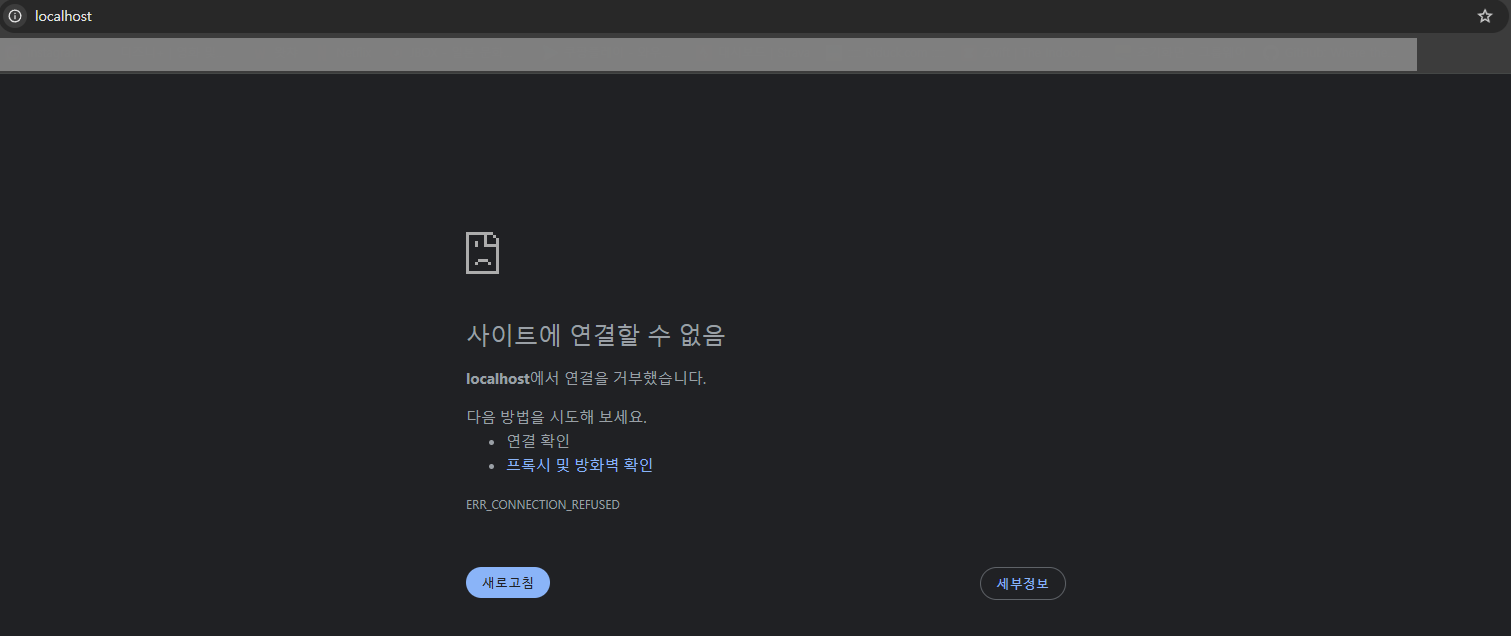
브라우저에서 http://localhost:80/ 접속시 접속되지 않는다.
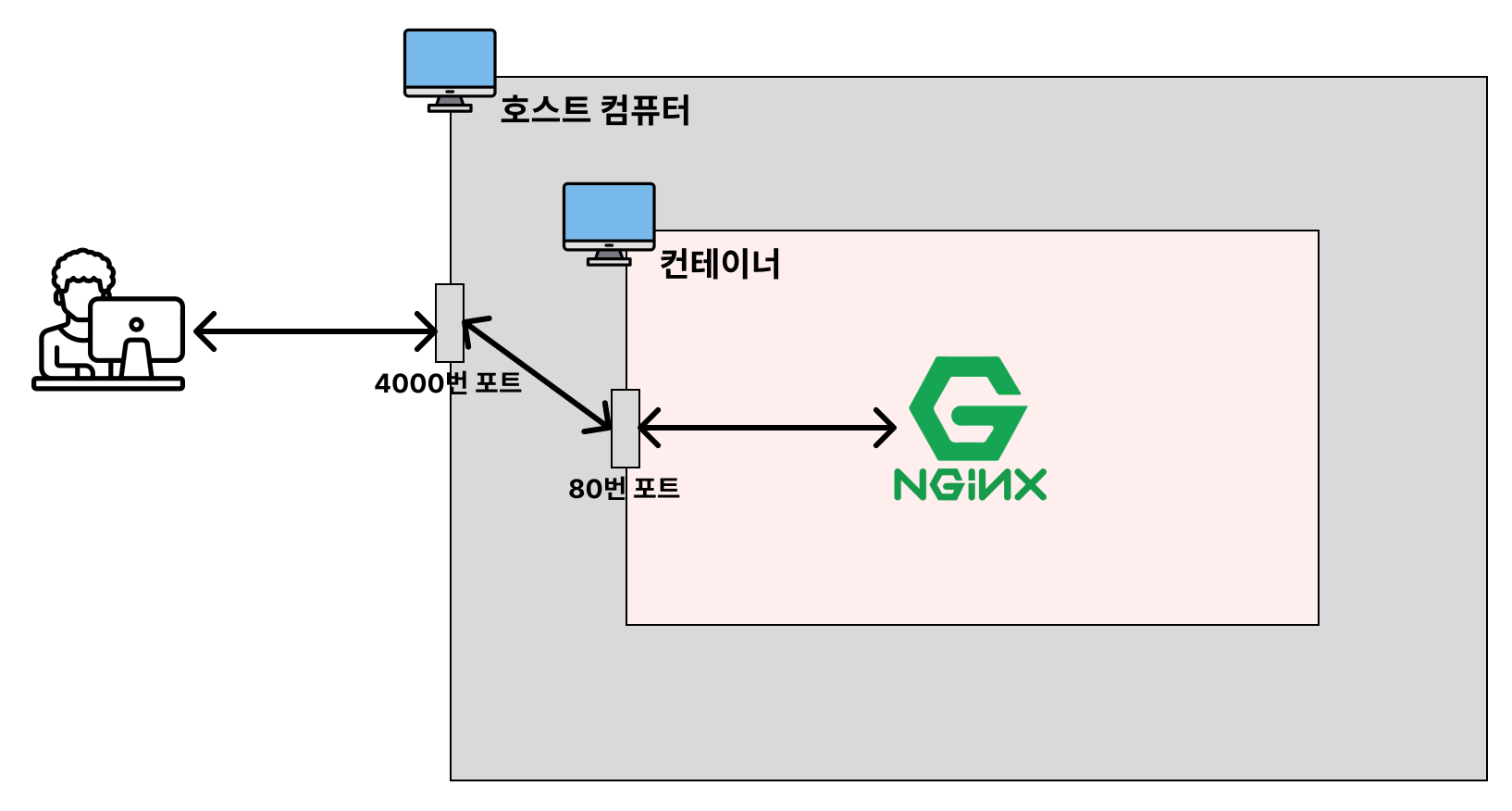
호스트 컴퓨터와 컨테이너는 독립되어 있는데, 컨테이너는 외부에서 바로 접근할 수 없고 호스트 컴퓨터를 통해서 접근할 수 있다.
- Windows PowerShell
PS C:\Users\admin> docker stop d9cd
d9cd
PS C:\Users\admin> docker rm d9cd
d9cd
PS C:\Users\admin> docker ps -a
CONTAINER ID   IMAGE     COMMAND   CREATED   STATUS    PORTS     NAMES
PS C:\Users\admin> docker run -d -p 4000:80 nginx
611c04f6dc3b2af21fe56f96f2d17064638183f7959b8a9ce42865c4f525d886
PS C:\Users\admin> docker ps
CONTAINER ID   IMAGE     COMMAND                  CREATED          STATUS          PORTS                                     NAMES
611c04f6dc3b   nginx     "/docker-entrypoint.…"   15 seconds ago   Up 14 seconds   0.0.0.0:4000->80/tcp, [::]:4000->80/tcp   friendly_jones
도커를 실행하는 호스트의 4000번 포트를 컨테이너의 80번 포트로 연결하도록 설정
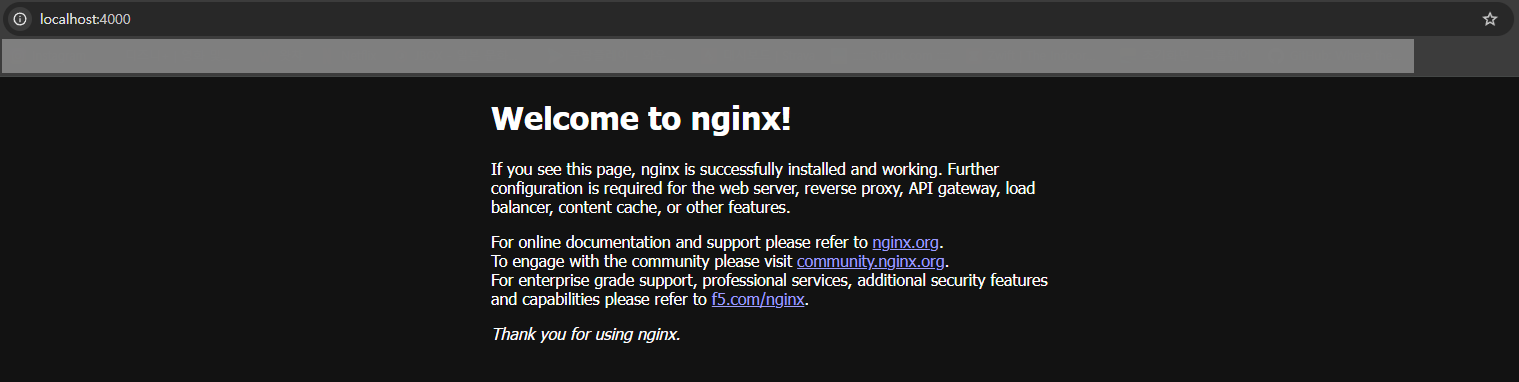
브라우저에서 http://localhost:4000/ 접속시 Nginx 서버가 실행된 화면을 확인할 수 있다.
이번에는 호스트 포트를 80번으로 바꿔서 컨테이너의 80번 포트로 연결하도록 응용해본다.
- Windows PowerShell
PS C:\Users\admin> docker stop 611c
611c
PS C:\Users\admin> docker rm 611c
611c
PS C:\Users\admin> docker ps -a
CONTAINER ID   IMAGE     COMMAND   CREATED   STATUS    PORTS     NAMES
PS C:\Users\admin> docker run -d -p 80:80 nginx
949a646a23b6d4fe5d8877c0d1a8e6be7a45e0cebf5196a6ef59c6e064c825ef
PS C:\Users\admin> docker ps
CONTAINER ID   IMAGE     COMMAND                  CREATED          STATUS          PORTS                                 NAMES
949a646a23b6   nginx     "/docker-entrypoint.…"   54 seconds ago   Up 52 seconds   0.0.0.0:80->80/tcp, [::]:80->80/tcp   nice_keldysh
브라우저에서 http://localhost:80/ 접속시 Nginx 서버가 실행된 화면을 확인할 수 있다.

* 참고
Nginx 테스트시 크롬 시크릿 모드로 실행할 것을 권장 (캐싱 때문)
참고링크 : https://www.inflearn.com/course/%EB%B9%84%EC%A0%84%EA%B3%B5%EC%9E%90-docker-%EC%9E%85%EB%AC%B8-%EC%8B%A4%EC%A0%84?cid=334085
비전공자도 이해할 수 있는 Docker 입문/실전| JSCODE 박재성 - 인프런 강의
현재 평점 4.9점 수강생 14,441명인 강의를 만나보세요. 비전공자 입장에서도 쉽게 이해할 수 있고, 실전에서 바로 적용 가능한 Docker 입문/실전 강의를 만들어봤습니다! Docker 기본 개념, Spring Boot를
www.inflearn.com
'강의 실습 > 비전공자도 이해할 수 있는 Docker 입문 실전' 카테고리의 다른 글
| 컨테이너(Container) 로그 조회 (0) | 2026.05.03 |
|---|---|
| 컨테이너(Container) 조회 / 중지 / 삭제 (0) | 2026.05.02 |
| 컨테이너(Container) 생성 / 실행 - 1 (0) | 2026.05.01 |
| 이미지(Image) 조회 / 삭제 (0) | 2026.05.01 |
| 이미지(Image) 다운로드 (1) | 2026.04.29 |

댓글