Route 53 적용 이유)
EC2 생성하며 IP 주소를 제공받았지만,
#1 IP는 사람들이 기억하기 어렵다.
#2 IP에는 HTTPS 적용이 불가능하다.
따라서, IP 주소만으로 EC2 백엔드 서버 운영하는데 한계가 있다.
1. EC2 생성
"인스턴스 시작" 버튼 클릭
- 이름 : test-server
- 애플리케이션 및 OS 이미지(Amazon Machine Image) : Ubuntu Server 24.04 LTS (HVM), SSD Volume Type
- 인스턴스 유형 : t2.micro
- 키 페어
이름 : test-server-key-pair
키 페어 유형 : RSA
프라이빗 키 파일 형식 : .pem
- 네트워크 설정 - 방화벽(보안 그룹)
보안 그룹 이름 : test-server-security-group
설명 : test-server-security-group created 2025-12-23T11:19:22.610Z
인바운드 보안 그룹 규칙)
보안 그룹 규칙 1 (TCP, 22, 0.0.0.0/0)
유형 : ssh
프로토콜 : TCP
포트 범위 : 22
소스 유형 : 위치 무관
보안 그룹 규칙 2 (TCP, 80, 0.0.0.0/0)
유형 : HTTP
프로토콜 : TCP
포트 범위 : 80
소스 유형 : 위치 무관
- 스토리지 구성
크기(GiB) : 30
볼륨 유형 : gp3
"인스턴스 시작" 버튼 클릭
2. 탄력적 IP 주소 생성
네트워크 및 보안 > 탄력적 IP 메뉴 선택
탄력적 IP 주소 할당)
퍼블릭 IPv4 주소 풀 : Amazon의 IPv4 주소 풀 선택
"할당" 버튼 클릭
할당된 IPv4 주소 선택 후, 작업 > 탄력적 IP 주소 연결 클릭
인스턴스 선택 후 "연결" 버튼 클릭
인스턴스 > 인스턴스 메뉴에서 생성한 EC2 인스턴스 요약의 퍼블릭 IPv4 주소를 보면 탄력적 IP 주소 연결이 잘 된 것을 확인할 수 있다.
3. EC2 인스턴스 연결 후 Express 서버 배포
EC2 인스턴스에 접속하여 Express 서버를 배포한다.
- Ubuntu
ubuntu@ip-172-31-37-154:~$ sudo su
root@ip-172-31-37-154:/home/ubuntu# apt-get update && /
apt-get install -y ca-certificates curl gnupg && /
mkdir -p /etc/apt/keyrings && /
curl -fsSL https://deb.nodesource.com/gpgkey/nodesource-repo.gpg.key | sudo gpg --dearmor -o /etc/apt/keyrings/nodesource.gpg && /
NODE_MAJOR=20 && /
echo "deb [signed-by=/etc/apt/keyrings/nodesource.gpg] https://deb.nodesource.com/node_$NODE_MAJOR.x nodistro main" | sudo tee /etc/apt/sources.list.d/nodesource.list && /
apt-get update && /
apt-get install nodejs -y
Hit:1 http://ap-northeast-2.ec2.archive.ubuntu.com/ubuntu noble InRelease
Get:2 http://ap-northeast-2.ec2.archive.ubuntu.com/ubuntu noble-updates InRelease [126 kB]
Get:3 http://ap-northeast-2.ec2.archive.ubuntu.com/ubuntu noble-backports InRelease [126 kB]
Get:4 http://security.ubuntu.com/ubuntu noble-security InRelease [126 kB]
Get:5 http://ap-northeast-2.ec2.archive.ubuntu.com/ubuntu noble/universe amd64 Packages [15.0 MB]
Get:6 http://ap-northeast-2.ec2.archive.ubuntu.com/ubuntu noble/universe Translation-en [5982 kB]
Get:7 http://ap-northeast-2.ec2.archive.ubuntu.com/ubuntu noble/universe amd64 Components [3871 kB]
Get:8 http://ap-northeast-2.ec2.archive.ubuntu.com/ubuntu noble/universe amd64 c-n-f Metadata [301 kB]
Get:9 http://ap-northeast-2.ec2.archive.ubuntu.com/ubuntu noble/multiverse amd64 Packages [269 kB]
Get:10 http://ap-northeast-2.ec2.archive.ubuntu.com/ubuntu noble/multiverse Translation-en [118 kB]
Get:11 http://ap-northeast-2.ec2.archive.ubuntu.com/ubuntu noble/multiverse amd64 Components [35.0 kB]
Get:12 http://ap-northeast-2.ec2.archive.ubuntu.com/ubuntu noble/multiverse amd64 c-n-f Metadata [8328 B]
Get:13 http://ap-northeast-2.ec2.archive.ubuntu.com/ubuntu noble-updates/main amd64 Packages [1684 kB]
Get:14 http://ap-northeast-2.ec2.archive.ubuntu.com/ubuntu noble-updates/main Translation-en [311 kB]
Get:15 http://ap-northeast-2.ec2.archive.ubuntu.com/ubuntu noble-updates/main amd64 Components [175 kB]
Get:16 http://ap-northeast-2.ec2.archive.ubuntu.com/ubuntu noble-updates/main amd64 c-n-f Metadata [15.8 kB]
Get:17 http://ap-northeast-2.ec2.archive.ubuntu.com/ubuntu noble-updates/universe amd64 Packages [1506 kB]
Get:18 http://ap-northeast-2.ec2.archive.ubuntu.com/ubuntu noble-updates/universe Translation-en [306 kB]
Get:19 http://ap-northeast-2.ec2.archive.ubuntu.com/ubuntu noble-updates/universe amd64 Components [377 kB]
Get:20 http://ap-northeast-2.ec2.archive.ubuntu.com/ubuntu noble-updates/universe amd64 c-n-f Metadata [31.4 kB]
Get:21 http://ap-northeast-2.ec2.archive.ubuntu.com/ubuntu noble-updates/restricted amd64 Packages [2413 kB]
Get:22 http://ap-northeast-2.ec2.archive.ubuntu.com/ubuntu noble-updates/restricted Translation-en [550 kB]
Get:23 http://ap-northeast-2.ec2.archive.ubuntu.com/ubuntu noble-updates/restricted amd64 Components [212 B]
Get:24 http://ap-northeast-2.ec2.archive.ubuntu.com/ubuntu noble-updates/restricted amd64 c-n-f Metadata [516 B]
Get:25 http://ap-northeast-2.ec2.archive.ubuntu.com/ubuntu noble-updates/multiverse amd64 Packages [30.3 kB]
Get:26 http://ap-northeast-2.ec2.archive.ubuntu.com/ubuntu noble-updates/multiverse Translation-en [6048 B]
Get:27 http://ap-northeast-2.ec2.archive.ubuntu.com/ubuntu noble-updates/multiverse amd64 Components [940 B]
Get:28 http://ap-northeast-2.ec2.archive.ubuntu.com/ubuntu noble-updates/multiverse amd64 c-n-f Metadata [488 B]
Get:29 http://ap-northeast-2.ec2.archive.ubuntu.com/ubuntu noble-backports/main amd64 Packages [40.4 kB]
Get:30 http://ap-northeast-2.ec2.archive.ubuntu.com/ubuntu noble-backports/main Translation-en [9208 B]
Get:31 http://ap-northeast-2.ec2.archive.ubuntu.com/ubuntu noble-backports/main amd64 Components [7312 B]
Get:32 http://ap-northeast-2.ec2.archive.ubuntu.com/ubuntu noble-backports/main amd64 c-n-f Metadata [368 B]
Get:33 http://ap-northeast-2.ec2.archive.ubuntu.com/ubuntu noble-backports/universe amd64 Packages [29.5 kB]
Get:34 http://ap-northeast-2.ec2.archive.ubuntu.com/ubuntu noble-backports/universe Translation-en [17.9 kB]
Get:35 http://ap-northeast-2.ec2.archive.ubuntu.com/ubuntu noble-backports/universe amd64 Components [10.5 kB]
Get:36 http://ap-northeast-2.ec2.archive.ubuntu.com/ubuntu noble-backports/universe amd64 c-n-f Metadata [1444 B]
Get:37 http://ap-northeast-2.ec2.archive.ubuntu.com/ubuntu noble-backports/restricted amd64 Components [216 B]
Get:38 http://ap-northeast-2.ec2.archive.ubuntu.com/ubuntu noble-backports/restricted amd64 c-n-f Metadata [116 B]
Get:39 http://ap-northeast-2.ec2.archive.ubuntu.com/ubuntu noble-backports/multiverse amd64 Components [212 B]
Get:40 http://ap-northeast-2.ec2.archive.ubuntu.com/ubuntu noble-backports/multiverse amd64 c-n-f Metadata [116 B]
Get:41 http://security.ubuntu.com/ubuntu noble-security/main amd64 Packages [1391 kB]
Get:42 http://security.ubuntu.com/ubuntu noble-security/main Translation-en [225 kB]
Get:43 http://security.ubuntu.com/ubuntu noble-security/main amd64 Components [21.5 kB]
Get:44 http://security.ubuntu.com/ubuntu noble-security/main amd64 c-n-f Metadata [9504 B]
Get:45 http://security.ubuntu.com/ubuntu noble-security/universe amd64 Packages [916 kB]
Get:46 http://security.ubuntu.com/ubuntu noble-security/universe Translation-en [207 kB]
Get:47 http://security.ubuntu.com/ubuntu noble-security/universe amd64 Components [71.4 kB]
Get:48 http://security.ubuntu.com/ubuntu noble-security/universe amd64 c-n-f Metadata [19.4 kB]
Get:49 http://security.ubuntu.com/ubuntu noble-security/restricted amd64 Packages [2286 kB]
Get:50 http://security.ubuntu.com/ubuntu noble-security/restricted Translation-en [523 kB]
Get:51 http://security.ubuntu.com/ubuntu noble-security/restricted amd64 Components [212 B]
Get:52 http://security.ubuntu.com/ubuntu noble-security/multiverse amd64 Packages [27.4 kB]
Get:53 http://security.ubuntu.com/ubuntu noble-security/multiverse Translation-en [5956 B]
Get:54 http://security.ubuntu.com/ubuntu noble-security/multiverse amd64 Components [212 B]
Get:55 http://security.ubuntu.com/ubuntu noble-security/multiverse amd64 c-n-f Metadata [384 B]
Fetched 39.2 MB in 24s (1605 kB/s)
Reading package lists... Done
bash: /: Is a directory
Reading package lists... Done
Building dependency tree... Done
Reading state information... Done
ca-certificates is already the newest version (20240203).
ca-certificates set to manually installed.
curl is already the newest version (8.5.0-2ubuntu10.6).
curl set to manually installed.
gnupg is already the newest version (2.4.4-2ubuntu17.3).
gnupg set to manually installed.
0 upgraded, 0 newly installed, 0 to remove and 68 not upgraded.
bash: /: Is a directory
bash: /: Is a directory
bash: /: Is a directory
bash: /: Is a directory
deb [signed-by=/etc/apt/keyrings/nodesource.gpg] https://deb.nodesource.com/node_20.x nodistro main
bash: /: Is a directory
Hit:1 http://ap-northeast-2.ec2.archive.ubuntu.com/ubuntu noble InRelease
Hit:2 http://ap-northeast-2.ec2.archive.ubuntu.com/ubuntu noble-updates InRelease
Hit:3 http://ap-northeast-2.ec2.archive.ubuntu.com/ubuntu noble-backports InRelease
Get:4 https://deb.nodesource.com/node_20.x nodistro InRelease [12.1 kB]
Get:5 https://deb.nodesource.com/node_20.x nodistro/main amd64 Packages [13.2 kB]
Hit:6 http://security.ubuntu.com/ubuntu noble-security InRelease
Fetched 25.3 kB in 1s (41.2 kB/s)
Reading package lists... Done
bash: /: Is a directory
Reading package lists... Done
Building dependency tree... Done
Reading state information... Done
The following NEW packages will be installed:
  nodejs
0 upgraded, 1 newly installed, 0 to remove and 68 not upgraded.
Need to get 32.0 MB of archives.
After this operation, 197 MB of additional disk space will be used.
Get:1 https://deb.nodesource.com/node_20.x nodistro/main amd64 nodejs amd64 20.19.6-1nodesource1 [32.0 MB]
Fetched 32.0 MB in 0s (67.2 MB/s)
Selecting previously unselected package nodejs.
(Reading database ... 71735 files and directories currently installed.)
Preparing to unpack .../nodejs_20.19.6-1nodesource1_amd64.deb ...
Unpacking nodejs (20.19.6-1nodesource1) ...
Setting up nodejs (20.19.6-1nodesource1) ...
Processing triggers for man-db (2.12.0-4build2) ...
Scanning processes...
Scanning linux images...

Running kernel seems to be up-to-date.

No services need to be restarted.

No containers need to be restarted.

No user sessions are running outdated binaries.

No VM guests are running outdated hypervisor (qemu) binaries on this host.
root@ip-172-31-37-154:/home/ubuntu# node -v
v20.19.6
root@ip-172-31-37-154:/home/ubuntu# git clone https://github.com/JSCODE-EDU/ec2-express-sample
Cloning into 'ec2-express-sample'...
remote: Enumerating objects: 6, done.
remote: Counting objects: 100% (6/6), done.
remote: Compressing objects: 100% (5/5), done.
remote: Total 6 (delta 0), reused 6 (delta 0), pack-reused 0 (from 0)
Receiving objects: 100% (6/6), 7.60 KiB | 1.90 MiB/s, done.
root@ip-172-31-37-154:/home/ubuntu# cd ec2-express-sample
root@ip-172-31-37-154:/home/ubuntu/ec2-express-sample# npm i

added 63 packages, and audited 64 packages in 2s

12 packages are looking for funding
  run `npm fund` for details

6 vulnerabilities (3 low, 3 high)

To address all issues, run:
  npm audit fix

Run `npm audit` for details.
npm notice
npm notice New major version of npm available! 10.8.2 -> 11.7.0
npm notice Changelog: https://github.com/npm/cli/releases/tag/v11.7.0
npm notice To update run: npm install -g npm@11.7.0
npm notice
root@ip-172-31-37-154:/home/ubuntu/ec2-express-sample# vi .env
- Ubuntu Vim
DATABASE_NAME=my_database
~
~
~
~
:wq
- Ubuntu
root@ip-172-31-37-154:/home/ubuntu/ec2-express-sample# sudo npm i -g pm2

added 133 packages in 18s

13 packages are looking for funding
  run `npm fund` for details
root@ip-172-31-37-154:/home/ubuntu/ec2-express-sample# sudo pm2 start app.js

                        -------------

__/\\\\\\\\\\\\\____/\\\\____________/\\\\____/\\\\\\\\\_____
 _\/\\\/////////\\\_\/\\\\\\________/\\\\\\__/\\\///////\\\___
  _\/\\\_______\/\\\_\/\\\//\\\____/\\\//\\\_\///______\//\\\__
   _\/\\\\\\\\\\\\\/__\/\\\\///\\\/\\\/_\/\\\___________/\\\/___
    _\/\\\/////////____\/\\\__\///\\\/___\/\\\________/\\\//_____
     _\/\\\_____________\/\\\____\///_____\/\\\_____/\\\//________
      _\/\\\_____________\/\\\_____________\/\\\___/\\\/___________
       _\/\\\_____________\/\\\_____________\/\\\__/\\\\\\\\\\\\\\\_
        _\///______________\///______________\///__\///////////////__


                          Runtime Edition

        PM2 is a Production Process Manager for Node.js applications
                     with a built-in Load Balancer.

                Start and Daemonize any application:
                $ pm2 start app.js

                Load Balance 4 instances of api.js:
                $ pm2 start api.js -i 4

                Monitor in production:
                $ pm2 monitor

                Make pm2 auto-boot at server restart:
                $ pm2 startup

                To go further checkout:
                http://pm2.io/


                        -------------

[PM2] Spawning PM2 daemon with pm2_home=/root/.pm2
[PM2] PM2 Successfully daemonized
[PM2] Starting /home/ubuntu/ec2-express-sample/app.js in fork_mode (1 instance)
[PM2] Done.
┌────┬────────┬─────────────┬─────────┬─────────┬──────────┬────────┬──────┬───────────┬──────────┬──────────┬──────────┬──────────┐
│ id │ name   │ namespace   │ version │ mode    │ pid      │ uptime │ ↺    │ status    │ cpu      │ mem      │ user     │ watching │
├────┼────────┼─────────────┼─────────┼─────────┼──────────┼────────┼──────┼───────────┼──────────┼──────────┼──────────┼──────────┤
│ 0  │ app    │ default     │ 1.0.0   │ fork    │ 2323     │ 0s     │ 0    │ online    │ 0%       │ 29.1mb   │ root     │ disabled │
└────┴────────┴─────────────┴─────────┴─────────┴──────────┴────────┴──────┴───────────┴──────────┴──────────┴──────────┴──────────┘
root@ip-172-31-37-154:/home/ubuntu/ec2-express-sample# pm2 list
┌────┬────────┬─────────────┬─────────┬─────────┬──────────┬────────┬──────┬───────────┬──────────┬──────────┬──────────┬──────────┐
│ id │ name   │ namespace   │ version │ mode    │ pid      │ uptime │ ↺    │ status    │ cpu      │ mem      │ user     │ watching │
├────┼────────┼─────────────┼─────────┼─────────┼──────────┼────────┼──────┼───────────┼──────────┼──────────┼──────────┼──────────┤
│ 0  │ app    │ default     │ 1.0.0   │ fork    │ 2323     │ 2m     │ 0    │ online    │ 0%       │ 53.1mb   │ root     │ disabled │
└────┴────────┴─────────────┴─────────┴─────────┴──────────┴────────┴──────┴───────────┴──────────┴──────────┴──────────┴──────────┘
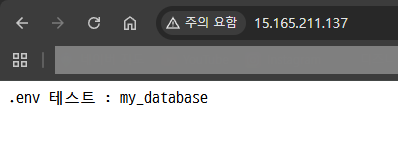
확인을 위해 IP로 서버에 접속한다.
실행된 서버 종료
- Ubuntu
root@ip-172-31-37-154:/home/ubuntu/ec2-express-sample# ps aux | grep pm2
root        2312  0.0  5.4 1026832 53804 ?       Ssl  11:37   0:00 PM2 v6.0.14: God Daemon (/root/.pm2)
root        2352  0.0  0.2   7076  2036 pts/1    S+   11:44   0:00 grep --color=auto pm2
root@ip-172-31-37-154:/home/ubuntu/ec2-express-sample# kill 2312
root@ip-172-31-37-154:/home/ubuntu/ec2-express-sample# ps aux | grep pm2
root 2355 0.0 0.2 7076 2076 pts/1 S+ 11:44 0:00 grep --color=auto pm2비전공자도 이해할 수 있는 AWS 입문/실전| JSCODE 박재성 - 인프런 강의
현재 평점 4.9점 수강생 2,832명인 강의를 만나보세요. 비전공자 입장에서도 쉽게 이해할 수 있고, 실전에서 바로 적용 가능한 AWS 입문 강의를 만들어봤습니다! EC2를 활용한 백엔드 API 서버 배포, R
www.inflearn.com
'강의 실습 > 비전공자도 이해할 수 있는 AWS 입문 실전' 카테고리의 다른 글
| [실습] 2. Route 53의 도메인을 EC2에 연결하기 (0) | 2025.12.24 |
|---|---|
| [실습] 1. Route 53에서 도메인 구매 (0) | 2025.12.24 |
| Route 53이란? / DNS란? / 현업에서의 Route 53 활용 여부 (0) | 2025.12.22 |
| 비용 나가지 않게 EC2 깔끔하게 종료하기 (0) | 2025.12.21 |
| [보충 강의] 7-2. Spring Boot 서버를 EC2에 배포하기 (1) | 2025.12.20 |


댓글