1. Docker로 MySQL 실행
1) MySQL 이미지를 바탕으로 컨테이너 실행
Docker Hub - mysql : https://hub.docker.com/_/mysql
mysql - Official Image | Docker Hub
Quick reference Supported tags and respective Dockerfile links 9.7.0, 9.7, 9, lts, latest, 9.7.0-oraclelinux9, 9.7-oraclelinux9, 9-oraclelinux9, lts-oraclelinux9, oraclelinux9, 9.7.0-oracle, 9.7-oracle, 9-oracle, lts-oracle, oracle 8.4.9, 8.4, 8,
hub.docker.com
- Windows PowerShell
PS C:\Users\admin> netstat -ano | findstr 3306
PS C:\Users\admin> docker run -p 3306:3306 -d mysql
Unable to find image 'mysql:latest' locally
latest: Pulling from library/mysql
53faec57e673: Pull complete
2289aa81323e: Pull complete
9e1e11de502d: Pull complete
bfad527af331: Pull complete
98aef952816f: Pull complete
e070bfedbe5c: Pull complete
18084fb5d973: Pull complete
edf85873f64e: Pull complete
8fa99ae45fef: Pull complete
6c2253d147ea: Pull complete
3769042852bc: Download complete
88f318259e72: Download complete
Digest: sha256:f0ef1d92fa650fcfa5b85f1d82bb1a56a6dd579bf256b8f8f2a5a0b1b61c8b0b
Status: Downloaded newer image for mysql:latest
b3b110d01538d9eabad26149b462a6bbaff44a940b54ae26b7ee0faba95ede07
PS C:\Users\admin> docker ps
CONTAINER ID   IMAGE     COMMAND   CREATED   STATUS    PORTS     NAMES
PS C:\Users\admin> docker ps -a
CONTAINER ID   IMAGE     COMMAND                  CREATED              STATUS                          PORTS     NAMES
b3b110d01538   mysql     "docker-entrypoint.s…"   About a minute ago   Exited (1) About a minute ago             dazzling_bardeen
PS C:\Users\admin> docker logs b3b1
2026-05-07 15:06:54+00:00 [Note] [Entrypoint]: Entrypoint script for MySQL Server 9.7.0-1.el9 started.
2026-05-07 15:06:54+00:00 [Note] [Entrypoint]: Switching to dedicated user 'mysql'
2026-05-07 15:06:54+00:00 [Note] [Entrypoint]: Entrypoint script for MySQL Server 9.7.0-1.el9 started.
2026-05-07 15:06:54+00:00 [ERROR] [Entrypoint]: Database is uninitialized and password option is not specified
    You need to specify one of the following as an environment variable:
    - MYSQL_ROOT_PASSWORD
    - MYSQL_ALLOW_EMPTY_PASSWORD
    - MYSQL_RANDOM_ROOT_PASSWORD

What's next:
    View and search logs for all containers in one place
    with Docker Desktop's Logs view. docker-desktop://dashboard/logs
패스워드 옵션을 설정하지 않으면 컨테이너가 실행되지 않는다.
- Windows PowerShell
PS C:\Users\admin> docker run -e MYSQL_ROOT_PASSWORD=pwd123 -p 3306:3306 -d mysql
61a209a81c2d84172c829a6a5ce3fc39d2927d1caeb180bd7e9dadf961dc412d
· -e MYSQL_ROOT_PASSWORD=비밀번호 : -e 옵션은 컨테이너의 환경 변수 설정 옵션
Docker Hub MySQL 공식 문서에 환경 변수로 MYSQL_ROOT_PASSWORD 를 정해주어야 컨테이너가 정상 실행된다고 적혀 있음
즉, 비밀번호를 설정해 주어야 한다.
- Windows PowerShell
PS C:\Users\admin> docker ps
CONTAINER ID   IMAGE     COMMAND                  CREATED         STATUS         PORTS                                         NAMES
61a209a81c2d   mysql     "docker-entrypoint.s…"   3 minutes ago   Up 3 minutes   0.0.0.0:3306->3306/tcp, [::]:3306->3306/tcp   interesting_rubin
PS C:\Users\admin> docker exec -it 61a2 bash
bash-5.1# ls
afs  bin  boot  dev  docker-entrypoint-initdb.d  etc  home  lib  lib64  media  mnt  opt  proc  root  run  sbin  srv  sys  tmp  usr  var
bash-5.1# echo $MYSQL_ROOT_PASSWORD # MYSQL_ROOT_PASSWORD라는 환경변수 값 출력
pwd123
bash-5.1# export # 설정되어 있는 모든 환경변수 출력
declare -x GOSU_VERSION="1.19"
declare -x HOME="/root"
declare -x HOSTNAME="61a209a81c2d"
declare -x MYSQL_MAJOR="9.7"
declare -x MYSQL_ROOT_PASSWORD="pwd123"
declare -x MYSQL_SHELL_VERSION="9.7.0-1.el9"
declare -x MYSQL_VERSION="9.7.0-1.el9"
declare -x OLDPWD
declare -x PATH="/usr/local/sbin:/usr/local/bin:/usr/sbin:/usr/bin:/sbin:/bin"
declare -x PWD="/"
declare -x SHLVL="1"
declare -x TERM="xterm
bash-5.1# exit
exit

What's next:
    Try Docker Debug for seamless, persistent debugging tools in any container or image → docker debug 61a2
    Learn more at https://docs.docker.com/go/debug-cli/
컨테이너에서 환경 변수를 확인할 수 있다.
2) 컨테이너 실행 체크
- Windows PowerShell
PS C:\Users\admin> docker ps
CONTAINER ID   IMAGE     COMMAND                  CREATED              STATUS              PORTS                                         NAMES
61a209a81c2d   mysql     "docker-entrypoint.s…"   About a minute ago   Up About a minute   0.0.0.0:3306->3306/tcp, [::]:3306->3306/tcp   interesting_rubin
3) 컨테이너가 에러 없이 실행되는지 로그 체크
- Windows PowerShell
PS C:\Users\admin> docker logs 61a2
2026-05-07 15:14:34+00:00 [Note] [Entrypoint]: Entrypoint script for MySQL Server 9.7.0-1.el9 started.
2026-05-07 15:14:34+00:00 [Note] [Entrypoint]: Switching to dedicated user 'mysql'
2026-05-07 15:14:34+00:00 [Note] [Entrypoint]: Entrypoint script for MySQL Server 9.7.0-1.el9 started.
2026-05-07 15:14:34+00:00 [Note] [Entrypoint]: Initializing database files
2026-05-07T15:14:34.444926Z 0 [System] [MY-015017] [Server] MySQL Server Initialization - start.
2026-05-07T15:14:34.445867Z 0 [System] [MY-013169] [Server] /usr/sbin/mysqld (mysqld 9.7.0) initializing of server in progress as process 80
2026-05-07T15:14:34.454824Z 1 [System] [MY-013576] [InnoDB] InnoDB initialization has started.
2026-05-07T15:14:34.948203Z 1 [System] [MY-013577] [InnoDB] InnoDB initialization has ended.
2026-05-07T15:14:37.171130Z 6 [Warning] [MY-010453] [Server] root@localhost is created with an empty password ! Please consider switching off the --initialize-insecure option.
2026-05-07T15:14:40.140570Z 0 [System] [MY-015018] [Server] MySQL Server Initialization - end.
2026-05-07 15:14:40+00:00 [Note] [Entrypoint]: Database files initialized
2026-05-07 15:14:40+00:00 [Note] [Entrypoint]: Starting temporary server
2026-05-07T15:14:40.186987Z 0 [System] [MY-015015] [Server] MySQL Server - start.
2026-05-07T15:14:40.398124Z 0 [System] [MY-010116] [Server] /usr/sbin/mysqld (mysqld 9.7.0) starting as process 126
2026-05-07T15:14:40.398133Z 0 [System] [MY-015603] [Server] MySQL Server has access to 20 logical CPUs.
2026-05-07T15:14:40.398143Z 0 [System] [MY-015603] [Server] MySQL Server has access to 33578708992 bytes of physical memory.
2026-05-07T15:14:40.413847Z 1 [System] [MY-013576] [InnoDB] InnoDB initialization has started.
2026-05-07T15:14:40.870849Z 1 [System] [MY-013577] [InnoDB] InnoDB initialization has ended.
2026-05-07T15:14:41.217974Z 0 [Warning] [MY-010068] [Server] CA certificate ca.pem is self signed.
2026-05-07T15:14:41.218019Z 0 [System] [MY-013602] [Server] Channel mysql_main configured to support TLS. Encrypted connections are now supported for this channel.
2026-05-07T15:14:41.222850Z 0 [Warning] [MY-011810] [Server] Insecure configuration for --pid-file: Location '/var/run/mysqld' in the path is accessible to all OS users. Consider choosing a different directory.
2026-05-07T15:14:41.254362Z 0 [System] [MY-011323] [Server] X Plugin ready for connections. Socket: /var/run/mysqld/mysqlx.sock
2026-05-07T15:14:41.254507Z 0 [System] [MY-010931] [Server] /usr/sbin/mysqld: ready for connections. Version: '9.7.0'  socket: '/var/run/mysqld/mysqld.sock'  port: 0  MySQL Community Server - GPL.
2026-05-07 15:14:41+00:00 [Note] [Entrypoint]: Temporary server started.
'/var/lib/mysql/mysql.sock' -> '/var/run/mysqld/mysqld.sock'
Warning: Unable to load '/usr/share/zoneinfo/iso3166.tab' as time zone. Skipping it.
Warning: Unable to load '/usr/share/zoneinfo/leap-seconds.list' as time zone. Skipping it.
Warning: Unable to load '/usr/share/zoneinfo/leapseconds' as time zone. Skipping it.
Warning: Unable to load '/usr/share/zoneinfo/tzdata.zi' as time zone. Skipping it.
Warning: Unable to load '/usr/share/zoneinfo/zone.tab' as time zone. Skipping it.
Warning: Unable to load '/usr/share/zoneinfo/zone1970.tab' as time zone. Skipping it.

2026-05-07 15:14:42+00:00 [Note] [Entrypoint]: Stopping temporary server
2026-05-07T15:14:42.459048Z 11 [System] [MY-013172] [Server] Received SHUTDOWN from user root. Shutting down mysqld (Version: 9.7.0).
2026-05-07T15:14:43.548272Z 0 [System] [MY-010910] [Server] /usr/sbin/mysqld: Shutdown complete (mysqld 9.7.0)  MySQL Community Server - GPL.
2026-05-07T15:14:43.548305Z 0 [System] [MY-015016] [Server] MySQL Server - end.
2026-05-07 15:14:44+00:00 [Note] [Entrypoint]: Temporary server stopped

2026-05-07 15:14:44+00:00 [Note] [Entrypoint]: MySQL init process done. Ready for start up.

2026-05-07T15:14:44.479162Z 0 [System] [MY-015015] [Server] MySQL Server - start.
2026-05-07T15:14:44.701727Z 0 [System] [MY-010116] [Server] /usr/sbin/mysqld (mysqld 9.7.0) starting as process 1
2026-05-07T15:14:44.701742Z 0 [System] [MY-015603] [Server] MySQL Server has access to 20 logical CPUs.
2026-05-07T15:14:44.701753Z 0 [System] [MY-015603] [Server] MySQL Server has access to 33578708992 bytes of physical memory.
2026-05-07T15:14:44.707637Z 1 [System] [MY-013576] [InnoDB] InnoDB initialization has started.
2026-05-07T15:14:45.185638Z 1 [System] [MY-013577] [InnoDB] InnoDB initialization has ended.
2026-05-07T15:14:45.389017Z 0 [Warning] [MY-010068] [Server] CA certificate ca.pem is self signed.
2026-05-07T15:14:45.389058Z 0 [System] [MY-013602] [Server] Channel mysql_main configured to support TLS. Encrypted connections are now supported for this channel.
2026-05-07T15:14:45.395140Z 0 [Warning] [MY-011810] [Server] Insecure configuration for --pid-file: Location '/var/run/mysqld' in the path is accessible to all OS users. Consider choosing a different directory.
2026-05-07T15:14:45.419836Z 0 [System] [MY-011323] [Server] X Plugin ready for connections. Bind-address: '::' port: 33060, socket: /var/run/mysqld/mysqlx.sock
2026-05-07T15:14:45.419932Z 0 [System] [MY-010931] [Server] /usr/sbin/mysqld: ready for connections. Version: '9.7.0'  socket: '/var/run/mysqld/mysqld.sock'  port: 3306  MySQL Community Server - GPL.

What's next:
    View and search logs for all containers in one place
    with Docker Desktop's Logs view. docker-desktop://dashboard/logs
4) DataGrip 에 연결
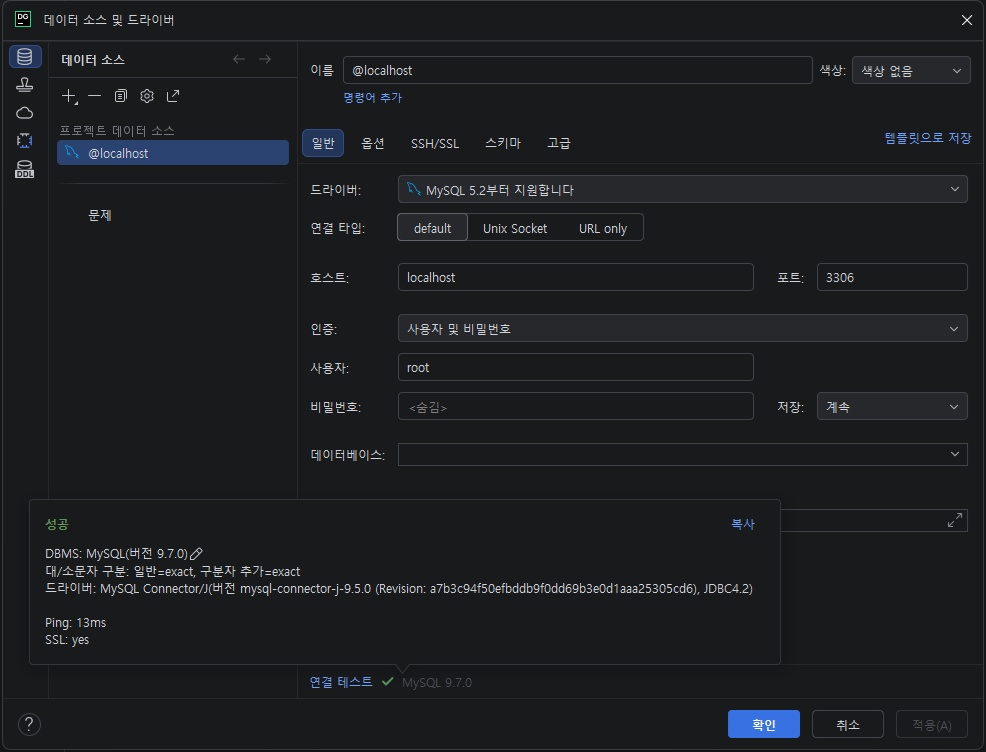
데이터베이스 탐색기 우클릭 > 새로 작성 > 데이터 소스 > MySQL > MySQL
호스트: localhost
사용자: root
비밀번호: pwd123
연결 테스트 성공 후, "적용" 버튼 클릭 후 "확인" 버튼 클릭
비전공자도 이해할 수 있는 Docker 입문/실전| JSCODE 박재성 - 인프런 강의
현재 평점 4.9점 수강생 14,449명인 강의를 만나보세요. 비전공자 입장에서도 쉽게 이해할 수 있고, 실전에서 바로 적용 가능한 Docker 입문/실전 강의를 만들어봤습니다! Docker 기본 개념, Spring Boot를
www.inflearn.com
'강의 실습 > 비전공자도 이해할 수 있는 Docker 입문 실전' 카테고리의 다른 글
| [실습] Docker로 MySQL 실행시켜보기 - 3 (0) | 2026.05.09 |
|---|---|
| [실습] Docker로 MySQL 실행시켜보기 - 2 (0) | 2026.05.08 |
| [보충 자료] Windows에서 lsof, kill, sudo 명령어가 작동하지 않을 때 대처 방법 (0) | 2026.05.06 |
| Docker Volume(도커 볼륨) (0) | 2026.05.06 |
| [실습] Docker로 Redis 실행시켜보기 (0) | 2026.05.05 |


댓글