1. 환경 설정
1) build.gradle
build.gradle 파일에 jdbc, h2 데이터베이스 관련 라이브러리 추가
- build.gradle
...
dependencies {
    ...
    implementation 'org.springframework.boot:spring-boot-starter-jdbc'
    ...
    runtimeOnly 'com.h2database:h2'
}
...
2) application.properties
스프링 부트 데이터베이스 연결 설정 추가
- src/main/resources/application.properties
...
spring.datasource.url=jdbc:h2:tcp://localhost/~/test
spring.datasource.driver-class-name=org.h2.Driver
spring.datasource.username=sa
스프링 부트 2.4 버전 이상 부터는 "spring.datasource.username=sa"를 꼭 추가한다. 또한 "sa" 뒤에 공백이 들어가지 않도록 주의한다.
2. JDBC 리포지토리 구현
JDBC API로 직접 코딩한 것은 26년 전 이야기니 참고만 하고 넘어간다.
1) JDBC 회원 리포지토리
- src/main/java/hello/hello_spring/repository/JdbcMemberRepository.java
package hello.hello_spring.repository;

import hello.hello_spring.domain.Member;
import org.springframework.jdbc.datasource.DataSourceUtils;

import javax.sql.DataSource;
import java.sql.*;
import java.util.ArrayList;
import java.util.List;
import java.util.Optional;

public class JdbcMemberRepository implements MemberRepository {

    private final DataSource dataSource;

    public JdbcMemberRepository(DataSource dataSource) {
        this.dataSource = dataSource;
    }

    @Override
    public Member save(Member member) {
        String sql = "insert into member(name) values(?)";

        Connection conn = null;
        PreparedStatement pstmt = null;
        ResultSet rs = null;

        try {
            conn = getConnection();
            pstmt = conn.prepareStatement(sql, Statement.RETURN_GENERATED_KEYS);

            pstmt.setString(1, member.getName());

            pstmt.executeUpdate();
            rs = pstmt.getGeneratedKeys();

            if (rs.next()) {
                member.setId(rs.getLong(1));
            } else {
                throw new SQLException("id 조회 실패");
            }

            return member;
        } catch (Exception e) {
            throw new IllegalStateException(e);
        } finally {
            close(conn, pstmt, rs);
        }
    }

    @Override
    public Optional<Member> findById(Long id) {
        String sql = "select * from member where id = ?";

        Connection conn = null;
        PreparedStatement pstmt = null;
        ResultSet rs = null;

        try {
            conn = getConnection();
            pstmt = conn.prepareStatement(sql);
            pstmt.setLong(1, id);

            rs = pstmt.executeQuery();

            if (rs.next()) {
                Member member = new Member();
                member.setId(rs.getLong("id"));
                member.setName(rs.getString("name"));
                return Optional.of(member);
            } else {
                return Optional.empty();
            }
        } catch (Exception e) {
            throw new IllegalStateException(e);
        } finally {
            close(conn, pstmt, rs);
        }
    }

    @Override
    public Optional<Member> findByName(String name) {
        String sql = "select * from member where name = ?";

        Connection conn = null;
        PreparedStatement pstmt = null;
        ResultSet rs = null;

        try {
            conn = getConnection();
            pstmt = conn.prepareStatement(sql);
            pstmt.setString(1, name);

            rs = pstmt.executeQuery();

            if (rs.next()) {
                Member member = new Member();
                member.setId(rs.getLong("id"));
                member.setName(rs.getString("name"));
                return Optional.of(member);
            }
            return Optional.empty();
        } catch (Exception e) {
            throw new IllegalStateException(e);
        } finally {
            close(conn, pstmt, rs);
        }
    }

    @Override
    public List<Member> findAll() {
        String sql = "select * from member";

        Connection conn = null;
        PreparedStatement pstmt = null;
        ResultSet rs = null;

        try {
            conn = getConnection();
            pstmt = conn.prepareStatement(sql);

            rs = pstmt.executeQuery();

            List<Member> members = new ArrayList<>();
            while (rs.next()) {
                Member member = new Member();
                member.setId(rs.getLong("id"));
                member.setName(rs.getString("name"));
                members.add(member);
            }

            return members;
        } catch (Exception e) {
            throw new IllegalStateException(e);
        } finally {
            close(conn, pstmt, rs);
        }
    }

    private Connection getConnection() {
        return DataSourceUtils.getConnection(dataSource);
    }

    private void close(Connection conn, PreparedStatement pstmt, ResultSet rs) {
        try {
            if (rs != null) {
                rs.close();
            }
        } catch (SQLException e) {
            e.printStackTrace();
        }
        try {
            if (pstmt != null) {
                pstmt.close();
            }
        } catch (SQLException e) {
            e.printStackTrace();
        }
        try {
            if (conn != null) {
                close(conn);
            }
        } catch (SQLException e) {
            e.printStackTrace();
        }
    }

    private void close(Connection conn) throws SQLException {
        DataSourceUtils.releaseConnection(conn, dataSource);
    }

}
사용한 자원들 잘 release 해야 한다. 그렇지 않으면 장애 발생.
스프링 프레임워크에서 Datasource 연결시, DataSourceUtils를 통해서 커넥션을 획득해야 한다. 트랜잭션 걸릴 수 있는데, 커넥션을 똑같은 것으로 유지시켜 주기 때문이다.
커넥션을 닫을 때에도 마찬가지로 DataSourceUtils를 통한다.
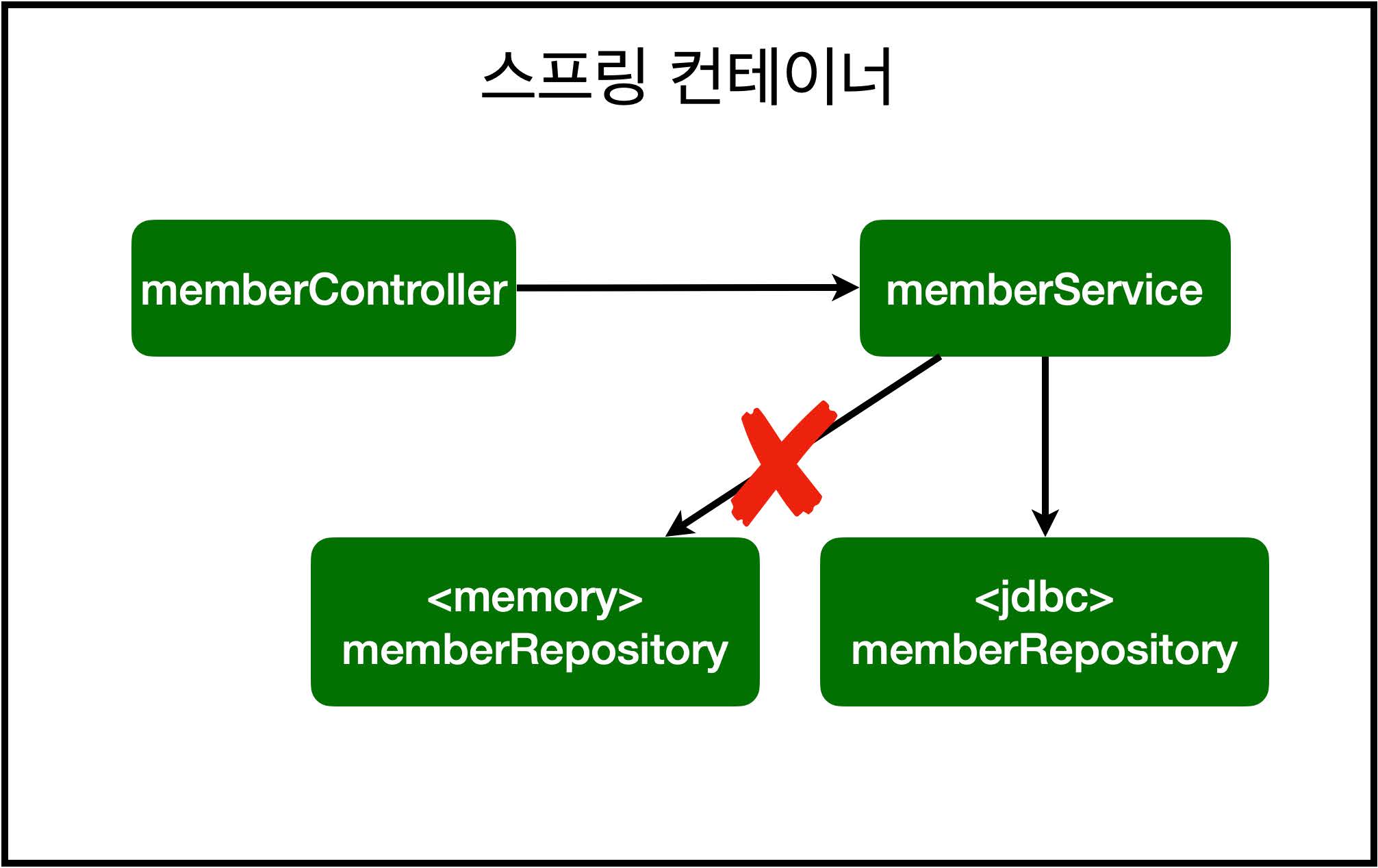
2) 스프링 설정 변경
스프링이 application.properties 설정 파일의 데이터베이스 커넥션 정보를 참고하여 DataSource를 빈으로 제공하기 때문에, DI 받을 수 있다. DataSource는 데이터베이스 커넥션을 획득할 때 사용하는 객체다.
- src/main/java/hello/hello_spring/SpringConfig.java
...
    private final DataSource dataSource;

    public SpringConfig(DataSource dataSource) {
        this.dataSource = dataSource;
    }
...
    @Bean
    public MemberRepository memberRepository() {
        // return new MemoryMemberRepository();
        return new JdbcMemberRepository(dataSource);
    }
...
에러 발생)
java.net.ConnectException: Connection refused: getsockopt
h2.bat 또는 h2.sh 파일을 실행하여 데이터베이스가 실행중이어야 한다.
3) 데이터 INSERT 후 SELECT
회원 가입 후, DB에 결과가 저장되었는지 회원 목록을 통해 확인한다.
등록한 회원의 시퀀스가 잘 못 나오는 경우, 테이블 데이터를 전부 삭제한 후 H2 시퀀스를 생성 후 초기화한다.
- SQL
DELETE FROM MEMBER;

CREATE SEQUENCE HIBERNATE_SEQUENCE START WITH 1 INCREMENT BY 1;

ALTER SEQUENCE HIBERNATE_SEQUENCE RESTART WITH 1;
H2 시퀀스 초기화
PK 칼럼인 SEQ 컬럼에서 게시글 번호가 말도 안되게 이렇게 갑자기 35로 건너뛰는 희귀한 현상이 발견...
blog.naver.com
[h2 database] h2-console 시퀀스 초기화 : https://rezal.tistory.com/entry/h2-database-h2-console-%EC%8B%9C%ED%80%80%EC%8A%A4-%EC%B4%88%EA%B8%B0%ED%99%94
[h2 database] h2-console 시퀀스 초기화
h2 database 에 JDBC 를 이용해서 회원등록, 회원조회 실습을 진행하는 도중 시퀀스가 33부터 발생하는 괴랄한 현상이 발생하였다... h2-console 에서 시퀀스 탭에 현재 값을 확인할 수 있었다. https://www.i
rezal.tistory.com
시퀀스 초기화가 제대로 적용되지 않으면, 테이블 삭제 후 재생성한다.

데이터를 DB에 저장하므로, 스프링 서버 재시작 후에도 데이터가 안전하게 보존된다.
4) 스프링을 왜 쓰는가?
#1 인터페이스 구현체를 바꿔끼우는 것을 통힌 다형성 활용
#2 스프링의 DI(Dependencies Injection)를 사용하여 애플리케이션 동작 관련 코드를 전혀 손대지 않고, 설정 코드만 수정하여 구현 클래스 변경 가능
#3 개방-폐쇄 원칙(OCP, Open-Closed Principle) : 확장에는 열려있고, 변경(수정)에는 닫혀있다.
-> SOLID 중 가장 중요함

[지금 무료]스프링 입문 - 코드로 배우는 스프링 부트, 웹 MVC, DB 접근 기술| 김영한 - 인프런 강의
현재 평점 5.0점 수강생 120,723명인 강의를 만나보세요. 스프링 입문자가 예제를 만들어가면서 스프링 웹 애플리케이션 개발 전반을 빠르게 학습할 수 있습니다. 예제를 만들면서 자연스럽게 스
www.inflearn.com
'강의 실습 > 스프링 입문 - 코드로 배우는 스프링 부트, 웹 MVC, DB 접근 기술' 카테고리의 다른 글
| 스프링 JdbcTemplate (0) | 2026.03.14 |
|---|---|
| 스프링 통합 테스트 (0) | 2026.03.13 |
| H2 데이터베이스 설치 (0) | 2026.03.11 |
| 회원 웹 기능 - 조회 (0) | 2026.03.10 |
| 회원 웹 기능 - 등록 (0) | 2026.03.09 |


댓글