1. Welcome Page 만들기
1) 스프링 부트가 제공하는 Welcome Page 기능
resources 경로에서 static/index.html 을 올려두면 Welcome page 기능을 제공한다. (Welcome page : 도메인으로만 들어왔을 때 첫 화면)
- src/main/resources/static/index.html
<!DOCTYPE HTML>
<html>
<head>
    <meta http-equiv="Content-Type" content="text/html; charset=UTF-8"/>
    <title>Hello</title>
</head>
<body>
Hello
<a href="/hello">hello</a>
</body>
</html>
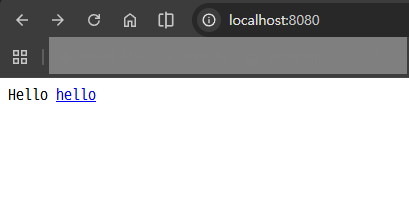
서버 실행 후 브라우저에서 http://localhost:8080/로 접속한다.
Spring Boot Features
Graceful shutdown is supported with all four embedded web servers (Jetty, Reactor Netty, Tomcat, and Undertow) and with both reactive and Servlet-based web applications. It occurs as part of closing the application context and is performed in the earliest
docs.spring.io
참고 링크로 들어가는 방법)
스프링 : https://spring.io/
Spring | Home
Cloud Your code, any cloud—we’ve got you covered. Connect and scale your services, whatever your platform.
spring.io
스프링 > Projects > Spring Boot > LEARN > 해당 버전 Reference Doc. > Search에 Welcome Page 검색
위 메뉴얼에서 검색을 통해 다양한 기능 찾을 수 있다.
-> 정적 파일
2) thymeleaf 템플릿 엔진 동작
thymeleaf 공식 사이트 : https://www.thymeleaf.org/
Thymeleaf
Integrations galore Eclipse, IntelliJ IDEA, Spring, Play, even the up-and-coming Model-View-Controller API for Java EE 8. Write Thymeleaf in your favourite tools, using your favourite web-development framework. Check out our Ecosystem to see more integrati
www.thymeleaf.org
스프링 공식 튜토리얼 : https://spring.io/guides/gs/serving-web-content/
Getting Started | Serving Web Content with Spring MVC
Static resources, including HTML and JavaScript and CSS, can be served from your Spring Boot application by dropping them into the right place in the source code. By default, Spring Boot serves static content from resources in the classpath at /static (or
spring.io
Spring Boot Features
Graceful shutdown is supported with all four embedded web servers (Jetty, Reactor Netty, Tomcat, and Undertow) and with both reactive and Servlet-based web applications. It occurs as part of closing the application context and is performed in the earliest
docs.spring.io
- src/main/java/hello/hello_spring/controller/HelloController.java
package hello.hello_spring.controller;

import org.springframework.stereotype.Controller;
import org.springframework.ui.Model;
import org.springframework.web.bind.annotation.GetMapping;

@Controller
public class HelloController {

    @GetMapping("hello")
    public String hello(Model model) {
        model.addAttribute("data", "hello!!");
        return "hello";
    }

}
- src/main/resources/templates/hello.html
<!DOCTYPE HTML>
<html xmlns:th="http://www.thymeleaf.org">
<head>
    <meta http-equiv="Content-Type" content="text/html; charset=UTF-8"/>
    <title>Hello</title>
</head>
<body>
<p th:text="'안녕하세요. ' + ${data}" >안녕하세요. 손님</p>
</body>
</html>
html 태그 속성 값으로 xmlns:th="http://www.thymeleaf.org"를 추가하면 해당 HTML 파일에서 타임리프 문법 사용 가능.
서버 재시작 후 브라우저에서 http://localhost:8080/hello 로 접속한다.


컨트롤러에서 리턴 값으로 문자를 반환하면 뷰 리졸버(viewResolver)가 화면을 찾아서 처리
-> 리턴 값 문자를 스프링 부트 템플릿엔진 기본 viewName 매핑
-> resources:templates/ + {ViewName} + .html
* 참고
spring-boot-devtools 라이브러리를 추가시, HTML 파일을 컴파일만 해주면 서버 재시작 없이 View 파일 변경 가능
인텔리J 컴파일 방법: 메뉴 > 빌드 > 다시 컴파일
참고링크 : https://www.inflearn.com/course/%EC%8A%A4%ED%94%84%EB%A7%81-%EC%9E%85%EB%AC%B8-%EC%8A%A4%ED%94%84%EB%A7%81%EB%B6%80%ED%8A%B8?cid=325630
[지금 무료]스프링 입문 - 코드로 배우는 스프링 부트, 웹 MVC, DB 접근 기술| 김영한 - 인프런 강의
현재 평점 5.0점 수강생 120,474명인 강의를 만나보세요. 스프링 입문자가 예제를 만들어가면서 스프링 웹 애플리케이션 개발 전반을 빠르게 학습할 수 있습니다. 예제를 만들면서 자연스럽게 스
www.inflearn.com
'강의 실습 > 스프링 입문 - 코드로 배우는 스프링 부트, 웹 MVC, DB 접근 기술' 카테고리의 다른 글
| MVC와 템플릿 엔진 (0) | 2026.02.28 |
|---|---|
| 정적 컨텐츠 (0) | 2026.02.26 |
| 빌드하고 실행하기 (0) | 2026.02.26 |
| 라이브러리 살펴보기 (0) | 2026.02.24 |
| 프로젝트 생성 (0) | 2026.02.23 |


댓글