1. 구현하고자 하는 인프라 구성
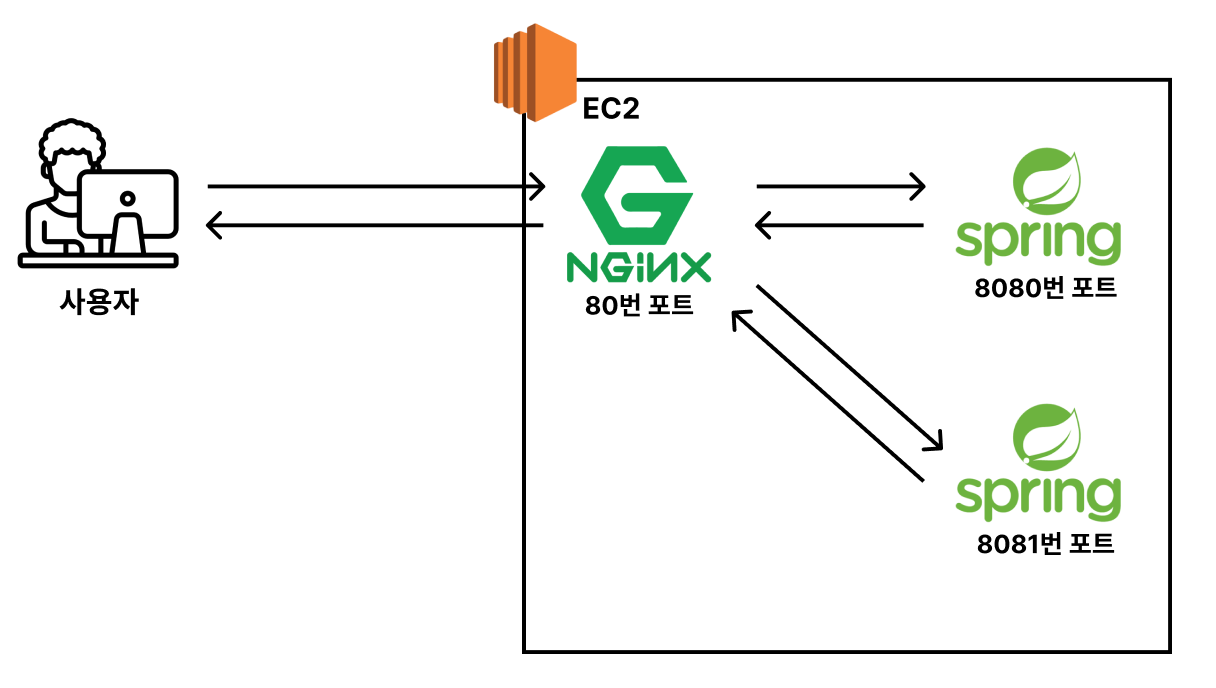
2. 하나의 EC2에서 백엔드 서버 2개를 로드밸런싱 시키기
1) EC2에 백엔드 서버(Spring Boot 서버) 2개 띄우기
8080번 포트에 Spring Boot 서버를 실행한 것이 있으니, 8081번 포트에 추가적으로 Spring Boot 서버를 실행한다.
기존 8080번 포트에 띄우던 명령어에 --server.port=8081 옵션을 추가한다.
- Ubuntu
ubuntu@ip-172-31-33-5:~$ ls
nginx-backend-springboot
ubuntu@ip-172-31-33-5:~$ cd nginx-backend-springboot
ubuntu@ip-172-31-33-5:~/nginx-backend-springboot$ ls
build  build.gradle  gradle  gradlew  gradlew.bat  nohup.out  settings.gradle  src
ubuntu@ip-172-31-33-5:~/nginx-backend-springboot$ cd build/libs
ubuntu@ip-172-31-33-5:~/nginx-backend-springboot/build/libs$ ls
nginx-backend-springboot-0.0.1-SNAPSHOT-plain.jar  nginx-backend-springboot-0.0.1-SNAPSHOT.jar  nohup.out
ubuntu@ip-172-31-33-5:~/nginx-backend-springboot/build/libs$ nohup java -jar nginx-backend-springboot-0.0.1-SNAPSHOT.jar &
[1] 1421
ubuntu@ip-172-31-33-5:~/nginx-backend-springboot/build/libs$ nohup: ignoring input and appending output to 'nohup.out'

ubuntu@ip-172-31-33-5:~/nginx-backend-springboot/build/libs$ nohup java -jar nginx-backend-springboot-0.0.1-SNAPSHOT.jar --server.port=8081 &
[2] 1451
ubuntu@ip-172-31-33-5:~/nginx-backend-springboot/build/libs$ nohup: ignoring input and appending output to 'nohup.out'
2) 8080번 포트, 8081번 포트에 Spring Boot 서버가 잘 띄워졌는 지 확인
- Ubuntu
ubuntu@ip-172-31-33-5:~/nginx-backend-springboot/build/libs$ sudo lsof -i:8080
COMMAND  PID   USER   FD   TYPE DEVICE SIZE/OFF NODE NAME
java    1421 ubuntu    9u  IPv6   9617      0t0  TCP *:http-alt (LISTEN)
ubuntu@ip-172-31-33-5:~/nginx-backend-springboot/build/libs$ sudo lsof -i:8081
COMMAND  PID   USER   FD   TYPE DEVICE SIZE/OFF NODE NAME
java    1451 ubuntu    9u  IPv6   9639      0t0  TCP *:tproxy (LISTEN)
3) Nginx 설정 변경
- Ubuntu
ubuntu@ip-172-31-33-5:~/nginx-backend-springboot/build/libs$ cd /etc/nginx/conf.d/websites
ubuntu@ip-172-31-33-5:/etc/nginx/conf.d/websites$ ls
admin.jint-front-test.link.conf  api.jint-front-test.link.conf  jint-front-test.link.conf
ubuntu@ip-172-31-33-5:/etc/nginx/conf.d/websites$ sudo vi api.jint-front-test.link.conf
- Ubuntu Vim
limit_req_zone $binary_remote_addr zone=mylimit:10m rate=3r/s;

upstream backend {
    server localhost:8080;
    server localhost:8081;
}

server {
    server_name api.jint-front-test.link;
    listen 443 ssl; # managed by Certbot

    limit_req zone=mylimit;
    limit_req_status 429;

    location / {
        proxy_pass http://backend;
    }

    ssl_certificate /etc/letsencrypt/live/api.jint-front-test.link/fullchain.pem; # managed by Certbot
    ssl_certificate_key /etc/letsencrypt/live/api.jint-front-test.link/privkey.pem; # managed by Certbot
    include /etc/letsencrypt/options-ssl-nginx.conf; # managed by Certbot
    ssl_dhparam /etc/letsencrypt/ssl-dhparams.pem; # managed by Certbot
}

server {
    server_name api.jint-front-test.link;
    listen 80;

    if ($host = api.jint-front-test.link) {
        return 301 https://$host$request_uri;
    } # managed by Certbot

    return 404; # managed by Certbot
}
~
~
~
~
:wq
#1 upstream
로드 밸런싱 대상 서버들을 upstream이라는 그룹으로 묶음. upstream 그룹 이름은 "backend"라고 지정.
#2 proxy_pass http://backend;
upstream 그룹에서 지정한 서버들로 요청이 분산됨. 즉, 로드 밸런싱 기능이 적용된다.
4) 변경된 nginx 설정파일 반영
문법 에러 체크 후, 재시작하여 설정 파일을 반영한다. (서비스를 중단하지 않고 변경 사항 적용)
- Ubuntu
ubuntu@ip-172-31-33-5:/etc/nginx/conf.d/websites$ sudo nginx -t
nginx: the configuration file /etc/nginx/nginx.conf syntax is ok
nginx: configuration file /etc/nginx/nginx.conf test is successful
ubuntu@ip-172-31-33-5:/etc/nginx/conf.d/websites$ sudo nginx -s reload
5) 실제로 로드 밸런싱이 되는 지 확인
https://api.jint-front-test.link/health 링크로 접속하면, 각 서버의 고유한 ID값 출력하도록 구현되어 있다.
브라우저에서 https://api.jint-front-test.link/health 링크를 여러번 접속하여, Server ID 값이 바뀐다면 로드 밸런싱 기능이 잘 적용된 것이다.
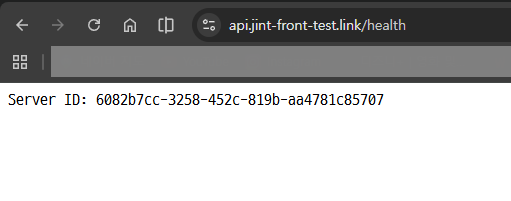
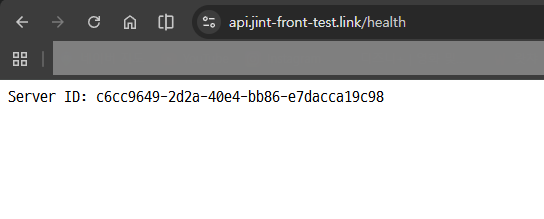
새로고침을 할 때마다 Server ID 값이 번갈아 출력된다. 로드 밸런싱 기능이 잘 적용된 것을 확인할 수 있다.
참고링크 : https://www.inflearn.com/course/%EB%B9%84%EC%A0%84%EA%B3%B5%EC%9E%90%EB%8F%84-%EC%9D%B4%ED%95%B4-nginx-%EC%9E%85%EB%AC%B8-%EC%8B%A4%EC%A0%84
비전공자도 이해할 수 있는 Nginx 입문/실전| JSCODE 박재성 - 인프런 강의
현재 평점 4.8점 수강생 988명인 강의를 만나보세요. 비전공자 입장에서도 쉽게 이해할 수 있고, 실전에서 바로 적용 가능한 'Nginx 입문/실전' 강의를 만들어봤습니다! Nginx의 기본 개념, Nginx 설치
www.inflearn.com
'강의 실습 > 비전공자도 이해할 수 있는 Nginx 입문 실전' 카테고리의 다른 글
| Nginx를 더 깊이 있게 공부하고 싶다면? (0) | 2026.02.21 |
|---|---|
| 비용 나가지 않게 사용한 AWS 서비스들 정리하기 (0) | 2026.02.21 |
| 로드 밸런서(Load Balancer)란? (0) | 2026.02.20 |
| [실습] IP당 요청 수 제한하기 (0) | 2026.02.19 |
| [실습] Spring Boot 서버에 HTTPS 적용하기 (0) | 2026.02.18 |


댓글