1. Nginx, Certbot을 활용해 HTTPS 적용시키기
참고 문서 : https://certbot.eff.org/instructions?ws=nginx&os=snap
Certbot Instructions
Certbot Instructions
certbot.eff.org
1) Certbot 라이브러리 설치
- Ubuntu
ubuntu@ip-172-31-33-5:~$ cd ~
ubuntu@ip-172-31-33-5:~$ sudo snap install --classic certbot
certbot 5.3.0 from Certbot Project (certbot-eff✓) installed
ubuntu@ip-172-31-33-5:~$ sudo ln -s /snap/bin/certbot /usr/bin/certbot
2) HTTPS 인증서 발급
명령어 : sudo certbot --nginx -d <도메인 주소>
- Ubuntu
ubuntu@ip-172-31-33-5:~$ sudo certbot --nginx -d jint-front-test.link
Saving debug log to /var/log/letsencrypt/letsencrypt.log
Enter email address or hit Enter to skip.
 (Enter 'c' to cancel): stbhg5@gmail.com

- - - - - - - - - - - - - - - - - - - - - - - - - - - - - - - - - - - - - - - -
Please read the Terms of Service at:
https://letsencrypt.org/documents/LE-SA-v1.6-August-18-2025.pdf
You must agree in order to register with the ACME server. Do you agree?
- - - - - - - - - - - - - - - - - - - - - - - - - - - - - - - - - - - - - - - -
(Y)es/(N)o: Y

- - - - - - - - - - - - - - - - - - - - - - - - - - - - - - - - - - - - - - - -
Would you be willing, once your first certificate is successfully issued, to
share your email address with the Electronic Frontier Foundation, a founding
partner of the Let's Encrypt project and the non-profit organization that
develops Certbot? We'd like to send you email about our work encrypting the web,
EFF news, campaigns, and ways to support digital freedom.
- - - - - - - - - - - - - - - - - - - - - - - - - - - - - - - - - - - - - - - -
(Y)es/(N)o: Y
Account registered.
Requesting a certificate for jint-front-test.link

Successfully received certificate.
Certificate is saved at: /etc/letsencrypt/live/jint-front-test.link/fullchain.pem
Key is saved at:         /etc/letsencrypt/live/jint-front-test.link/privkey.pem
This certificate expires on 2026-05-09.
These files will be updated when the certificate renews.
Certbot has set up a scheduled task to automatically renew this certificate in the background.

Deploying certificate
Successfully deployed certificate for jint-front-test.link to /etc/nginx/conf.d/default.conf
Congratulations! You have successfully enabled HTTPS on https://jint-front-test.link

- - - - - - - - - - - - - - - - - - - - - - - - - - - - - - - - - - - - - - - -
If you like Certbot, please consider supporting our work by:
 * Donating to ISRG / Let's Encrypt:   https://letsencrypt.org/donate
 * Donating to EFF:                    https://eff.org/donate-le
- - - - - - - - - - - - - - - - - - - - - - - - - - - - - - - - - - - - - - - -
ubuntu@ip-172-31-33-5:~$ sudo certbot --nginx -d admin.jint-front-test.link
Saving debug log to /var/log/letsencrypt/letsencrypt.log
Requesting a certificate for admin.jint-front-test.link

Successfully received certificate.
Certificate is saved at: /etc/letsencrypt/live/admin.jint-front-test.link/fullchain.pem
Key is saved at:         /etc/letsencrypt/live/admin.jint-front-test.link/privkey.pem
This certificate expires on 2026-05-09.
These files will be updated when the certificate renews.
Certbot has set up a scheduled task to automatically renew this certificate in the background.

Deploying certificate
Successfully deployed certificate for admin.jint-front-test.link to /etc/nginx/conf.d/default.conf
Congratulations! You have successfully enabled HTTPS on https://admin.jint-front-test.link

- - - - - - - - - - - - - - - - - - - - - - - - - - - - - - - - - - - - - - - -
If you like Certbot, please consider supporting our work by:
 * Donating to ISRG / Let's Encrypt:   https://letsencrypt.org/donate
 * Donating to EFF:                    https://eff.org/donate-le
- - - - - - - - - - - - - - - - - - - - - - - - - - - - - - - - - - - - - - - -
* 반드시 도메인을 먼저 연결한 후 위 명령어를 쳐야 정상 작동한다.
3) HTTPS 적용 확인
브라우저에서 https://jint-front-test.link/ 도메인과 https://admin.jint-front-test.link/ 도메인에 접속한다.
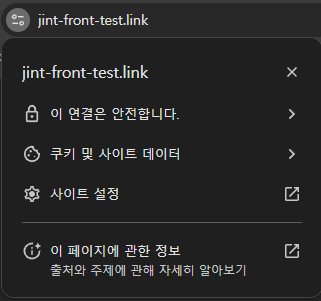
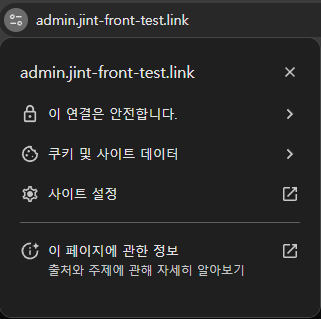
http:// 로 바꿔 접속해도 자동으로 https://로 바뀌어 접속된다.
도메인 주소를 IP에 연결한 채로 인증서를 발급받아야 한다. 또한 각 도메인 마다 인증서를 따로 발급받아야 한다.
참고링크 : https://www.inflearn.com/course/%EB%B9%84%EC%A0%84%EA%B3%B5%EC%9E%90%EB%8F%84-%EC%9D%B4%ED%95%B4-nginx-%EC%9E%85%EB%AC%B8-%EC%8B%A4%EC%A0%84
비전공자도 이해할 수 있는 Nginx 입문/실전| JSCODE 박재성 - 인프런 강의
현재 평점 4.8점 수강생 959명인 강의를 만나보세요. 비전공자 입장에서도 쉽게 이해할 수 있고, 실전에서 바로 적용 가능한 'Nginx 입문/실전' 강의를 만들어봤습니다! Nginx의 기본 개념, Nginx 설치
www.inflearn.com
'강의 실습 > 비전공자도 이해할 수 있는 Nginx 입문 실전' 카테고리의 다른 글
| [보충 강의] 설정 파일 분리해서 관리하기 (include) (0) | 2026.02.10 |
|---|---|
| Nginx, Certbot이 작성한 HTTPS 관련 코드 해석하기 (0) | 2026.02.09 |
| HTTPS를 왜 적용시켜야 할까? (0) | 2026.02.07 |
| [실습] 하나의 EC2에서 여러 웹 사이트 배포하기 (0) | 2026.02.06 |
| [실습] Route 53에서 구매한 도메인 EC2에 연결하기 (0) | 2026.02.05 |


댓글