1. 프로세스란?
# 프로세스(process) : 실행중인 프로그램
2. 리눅스에서 실행 중인 프로세스 조회하기
윈도우에서 ctrl + shift + esc 를 누르면 작업 관리자 창이 뜬다. 작업 관리자 창을 보면 현재 실행 중인 프로그램들(= 프로세스)을 확인할 수 있다.
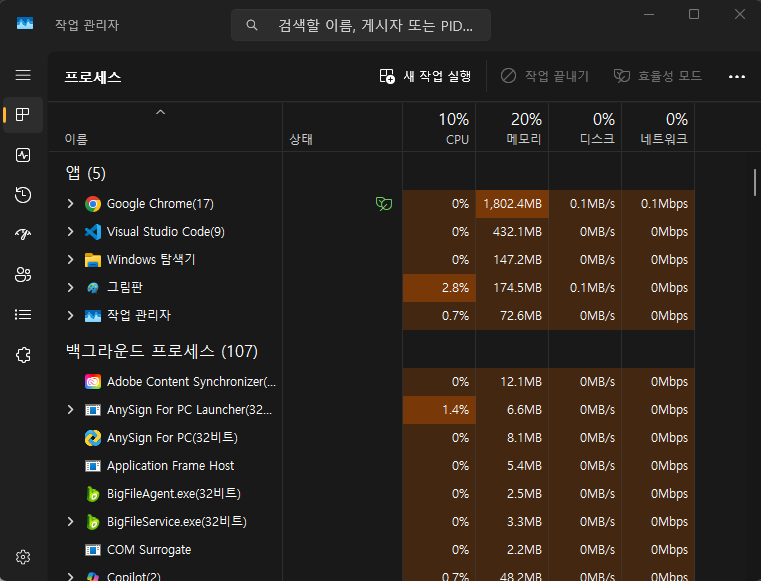
리눅스에서도 작업 관리자 창과 같이 실행 중인 프로그램들을 확인할 수 있는 명령어가 있다.
# ps aux : 실행 중인 모든 프로세스 조회
- Ubuntu
ubuntu@ip-172-31-39-75:~$ ps aux
USER         PID %CPU %MEM    VSZ   RSS TTY      STAT START   TIME COMMAND
root           1  0.0  1.2  22552 11608 ?        Ss   Aug31   2:18 /usr/lib/systemd/systemd --system --deserialize=76
root           2  0.0  0.0      0     0 ?        S    Aug31   0:01 [kthreadd]
root           3  0.0  0.0      0     0 ?        S    Aug31   0:00 [pool_workqueue_release]
root           4  0.0  0.0      0     0 ?        I<   Aug31   0:00 [kworker/R-rcu_gp]
root           5  0.0  0.0      0     0 ?        I<   Aug31   0:00 [kworker/R-sync_wq]
root           6  0.0  0.0      0     0 ?        I<   Aug31   0:00 [kworker/R-kvfree_rcu_reclaim]
root           7  0.0  0.0      0     0 ?        I<   Aug31   0:00 [kworker/R-slub_flushwq]
root           8  0.0  0.0      0     0 ?        I<   Aug31   0:00 [kworker/R-netns]
root          11  0.0  0.0      0     0 ?        I<   Aug31   0:00 [kworker/0:0H-events_highpri]
root          13  0.0  0.0      0     0 ?        I<   Aug31   0:00 [kworker/R-mm_percpu_wq]
root          14  0.0  0.0      0     0 ?        I    Aug31   0:00 [rcu_tasks_rude_kthread]
root          15  0.0  0.0      0     0 ?        I    Aug31   0:00 [rcu_tasks_trace_kthread]
root          16  0.0  0.0      0     0 ?        S    Aug31   0:04 [ksoftirqd/0]
root          17  0.0  0.0      0     0 ?        I    Aug31   2:01 [rcu_sched]
root          18  0.0  0.0      0     0 ?        S    Aug31   0:00 [rcu_exp_par_gp_kthread_worker/0]
root          19  0.0  0.0      0     0 ?        S    Aug31   0:00 [rcu_exp_gp_kthread_worker]
root          20  0.0  0.0      0     0 ?        S    Aug31   0:39 [migration/0]
root          21  0.0  0.0      0     0 ?        S    Aug31   0:00 [idle_inject/0]
root          22  0.0  0.0      0     0 ?        S    Aug31   0:00 [cpuhp/0]
root          23  0.0  0.0      0     0 ?        S    Aug31   0:00 [cpuhp/1]
root          24  0.0  0.0      0     0 ?        S    Aug31   0:00 [idle_inject/1]
root          25  0.0  0.0      0     0 ?        S    Aug31   0:28 [migration/1]
root          26  0.0  0.0      0     0 ?        S    Aug31   0:04 [ksoftirqd/1]
root          28  0.0  0.0      0     0 ?        I<   Aug31   0:00 [kworker/1:0H-events_highpri]
root          29  0.0  0.0      0     0 ?        S    Aug31   0:00 [kdevtmpfs]
root          30  0.0  0.0      0     0 ?        I<   Aug31   0:00 [kworker/R-inet_frag_wq]
root          31  0.0  0.0      0     0 ?        S    Aug31   0:00 [kauditd]
root          32  0.0  0.0      0     0 ?        S    Aug31   0:02 [khungtaskd]
root          34  0.0  0.0      0     0 ?        S    Aug31   0:00 [oom_reaper]
root          36  0.0  0.0      0     0 ?        I<   Aug31   0:00 [kworker/R-writeback]
root          37  0.0  0.0      0     0 ?        S    Aug31   4:39 [kcompactd0]
root          38  0.0  0.0      0     0 ?        SN   Aug31   0:00 [ksmd]
root          39  0.0  0.0      0     0 ?        SN   Aug31   0:00 [khugepaged]
root          40  0.0  0.0      0     0 ?        I<   Aug31   0:00 [kworker/R-kintegrityd]
root          41  0.0  0.0      0     0 ?        I<   Aug31   0:00 [kworker/R-kblockd]
root          42  0.0  0.0      0     0 ?        I<   Aug31   0:00 [kworker/R-blkcg_punt_bio]
root          43  0.0  0.0      0     0 ?        S    Aug31   0:00 [irq/9-acpi]
root          45  0.0  0.0      0     0 ?        I<   Aug31   0:00 [kworker/R-tpm_dev_wq]
root          46  0.0  0.0      0     0 ?        I<   Aug31   0:00 [kworker/R-ata_sff]
root          47  0.0  0.0      0     0 ?        I<   Aug31   0:00 [kworker/R-md]
root          48  0.0  0.0      0     0 ?        I<   Aug31   0:00 [kworker/R-md_bitmap]
root          49  0.0  0.0      0     0 ?        I<   Aug31   0:00 [kworker/R-edac-poller]
root          50  0.0  0.0      0     0 ?        I<   Aug31   0:00 [kworker/R-devfreq_wq]
root          51  0.0  0.0      0     0 ?        S    Aug31   0:00 [watchdogd]
root          52  0.0  0.0      0     0 ?        I<   Aug31   0:03 [kworker/1:1H-kblockd]
root          53  0.0  0.0      0     0 ?        S    Aug31   0:10 [kswapd0]
root          54  0.0  0.0      0     0 ?        S    Aug31   0:00 [ecryptfs-kthread]
root          55  0.0  0.0      0     0 ?        I<   Aug31   0:00 [kworker/R-kthrotld]
root          56  0.0  0.0      0     0 ?        I<   Aug31   0:00 [kworker/R-acpi_thermal_pm]
root          57  0.0  0.0      0     0 ?        I<   Aug31   0:00 [kworker/R-nvme-wq]
root          58  0.0  0.0      0     0 ?        I<   Aug31   0:00 [kworker/R-nvme-reset-wq]
root          59  0.0  0.0      0     0 ?        I<   Aug31   0:00 [kworker/R-nvme-delete-wq]
root          60  0.0  0.0      0     0 ?        I<   Aug31   0:00 [kworker/R-nvme-auth-wq]
root          62  0.0  0.0      0     0 ?        I<   Aug31   0:00 [kworker/R-mld]
root          63  0.0  0.0      0     0 ?        I<   Aug31   0:00 [kworker/R-ipv6_addrconf]
root          70  0.0  0.0      0     0 ?        I<   Aug31   0:00 [kworker/R-kstrp]
root          72  0.0  0.0      0     0 ?        I<   Aug31   0:00 [kworker/u9:0]
root          85  0.0  0.0      0     0 ?        I<   Aug31   0:00 [kworker/R-charger_manager]
root          86  0.0  0.0      0     0 ?        S    Aug31   0:13 [jbd2/nvme0n1p1-8]
root          87  0.0  0.0      0     0 ?        I<   Aug31   0:00 [kworker/R-ext4-rsv-conversion]
root          88  0.0  0.0      0     0 ?        I<   Aug31   0:03 [kworker/0:1H-kblockd]
root         164  0.0  0.0      0     0 ?        I<   Aug31   0:00 [kworker/R-kmpathd]
root         165  0.0  0.0      0     0 ?        I<   Aug31   0:00 [kworker/R-kmpath_handlerd]
root         251  0.0  0.0      0     0 ?        I<   Aug31   0:00 [kworker/R-ena]
root         254  0.0  0.0      0     0 ?        I<   Aug31   0:00 [kworker/R-cryptd]
root         289  0.0  0.0      0     0 ?        S    Aug31   0:00 [jbd2/nvme0n1p16-8]
root         290  0.0  0.0      0     0 ?        I<   Aug31   0:00 [kworker/R-ext4-rsv-conversion]
message+     604  0.0  0.3  10040  3596 ?        Ss   Aug31   1:01 @dbus-daemon --system --address=systemd: --nofork --nopidfile --systemd-activation --syslog-only
root         612  0.0  1.4  32424 13108 ?        Ss   Aug31   0:00 /usr/bin/python3 /usr/bin/networkd-dispatcher --run-startup-triggers
root         621  0.0  0.5  18168  5612 ?        Ss   Aug31   0:13 /usr/lib/systemd/systemd-logind
root         704  0.0  0.0   6148   476 ttyS0    Ss+  Aug31   0:00 /sbin/agetty -o -p -- \u --keep-baud 115200,57600,38400,9600 - vt220
root         726  0.0  1.1 110020 10888 ?        Ssl  Aug31   0:00 /usr/bin/python3 /usr/share/unattended-upgrades/unattended-upgrade-shutdown --wait-for-signal
root         805  0.0  0.0   6104   464 tty1     Ss+  Aug31   0:00 /sbin/agetty -o -p -- \u --noclear - linux
root         995  0.0  1.5 1830624 14860 ?       Ssl  Aug31   3:05 /snap/amazon-ssm-agent/11797/amazon-ssm-agent
root        1599  0.0  0.0      0     0 ?        I<   Aug31   0:00 [kworker/R-tls-strp]
root       82824  0.0  0.2   2720  1996 ?        Ss   Sep23   0:00 /usr/sbin/acpid
root       82827  0.0  0.4  82920  3792 ?        Ssl  Sep23   2:03 /usr/sbin/irqbalance
_chrony    82844  0.0  0.3  19400  3560 ?        S    Sep23   1:22 /usr/sbin/chronyd -F 1
_chrony    82845  0.0  0.2  11072  2236 ?        S    Sep23   0:00 /usr/sbin/chronyd -F 1
root       82854  0.0  2.8 288952 27088 ?        SLsl Sep23   7:23 /sbin/multipathd -d -s
polkitd    82891  0.0  0.8 383536  8212 ?        Ssl  Sep23   1:35 /usr/lib/polkit-1/polkitd --no-debug
root       82909  0.0  0.8 391876  7508 ?        Ssl  Sep23   0:00 /usr/sbin/ModemManager
syslog     82911  0.0  0.6 222508  5680 ?        Ssl  Sep23   0:12 /usr/sbin/rsyslogd -n -iNONE
root       83277  0.0  0.2   7224  2308 ?        Ss   Sep23   0:13 /usr/sbin/cron -f -P
root      131610  0.0  1.4  66844 13736 ?        S<s  Oct02   0:57 /usr/lib/systemd/systemd-journald
systemd+  131612  0.0  0.7  21580  6936 ?        Ss   Oct02   0:06 /usr/lib/systemd/systemd-resolved
root      131618  0.0  0.4  12020  4660 ?        Ss   Oct02   0:24 sshd: /usr/sbin/sshd -D -o AuthorizedKeysCommand /usr/share/ec2-instance-connect/eic_run_authorized_keys %u %f -o AuthorizedKeysCommandUser ec2-
root      131626  0.0  0.6  26488  5784 ?        Ss   Oct02   0:03 /usr/lib/systemd/systemd-udevd
root      131627  0.0  0.9 469088  9088 ?        Ssl  Oct02   1:22 /usr/libexec/udisks2/udisksd
root      131641  0.0  0.0      0     0 ?        S    Oct02   0:00 [psimon]
systemd+  131642  0.0  0.6  19000  6348 ?        Ss   Oct02   0:05 /usr/lib/systemd/systemd-networkd
root      223508  0.0  2.8 1923800 26908 ?       Ssl  Oct22   1:20 /usr/lib/snapd/snapd
root      360904  0.0  0.0      0     0 ?        I    04:50   0:00 [kworker/1:2-events]
root      361873  0.0  0.0      0     0 ?        I    10:44   0:00 [kworker/u8:0-events_unbound]
root      362248  0.0  0.0      0     0 ?        I    12:10   0:00 [kworker/0:0-cgroup_destroy]
root      362264  0.0  0.0      0     0 ?        I    12:20   0:00 [kworker/u8:2-events_power_efficient]
root      362270  0.0  0.0      0     0 ?        I    12:25   0:00 [kworker/u8:1-events_power_efficient]
root      362276  0.0  0.0      0     0 ?        I    12:30   0:00 [kworker/0:3-mm_percpu_wq]
root      362277  0.0  1.1  14708 10396 ?        Ss   12:33   0:00 sshd: ubuntu [priv]
root      362578  0.0  0.0      0     0 ?        S    12:33   0:00 [psimon]
ubuntu    362580  0.0  1.2  20276 11340 ?        Ss   12:33   0:00 /usr/lib/systemd/systemd --user
ubuntu    362581  0.0  0.3  21148  3508 ?        S    12:33   0:00 (sd-pam)
ubuntu    362690  0.0  0.7  14964  7016 ?        S    12:33   0:00 sshd: ubuntu@pts/0
ubuntu    362693  0.0  0.5   9056  5308 pts/0    Ss   12:33   0:00 -bash
root      362742  0.0  0.0      0     0 ?        I    12:40   0:00 [kworker/1:0-events]
root      362763  0.0  0.0      0     0 ?        I    12:46   0:00 [kworker/u8:3-writeback]
root      362767  0.0  0.0      0     0 ?        I    12:46   0:00 [kworker/1:1]
ubuntu    362768  0.0  0.4  11320  4436 pts/0    R+   12:46   0:00 ps aux
ps aux 명령어 실행시 출력되는 내용의 최상단 내용을 기준으로 살펴본다.
· USER : 프로세스를 실행한 사용자
· PID : 프로세스를 식별하기 위한 ID (Process ID)
· %CPU : CPU 사용률
· %MEM : 메모리 사용률
· COMMAND : 프로세스를 실행할 때 사용한 명령어를 보여줌 → 어떤 프로세스인지 쉽게 파악할 수 있음
모든 프로세스를 조회하니 보기가 불편하다. 실무에서는 특정 키워드가 포함된 문장만 출력되게끔 명령어를 많이 활용한다.
- Ubuntu
ubuntu@ip-172-31-39-75:~$ ps aux | grep amazon
root         995  0.0  1.5 1830624 14860 ?       Ssl  Aug31   3:05 /snap/amazon-ssm-agent/11797/amazon-ssm-agent
ubuntu    362778  0.0  0.2   7076  2120 pts/0    S+   12:54   0:00 grep --color=auto amazon
3. 프로세스 종료하기
# kill [PID 값] : 프로세스 종료
ps aux 명령어를 통해 실행 중인 프로세스를 조회한 뒤, 종료하고자 하는 프로세스의 PID 값을 활용해서 종료하면 된다.
참고링크 : https://www.inflearn.com/course/%EB%B9%84%EC%A0%84%EA%B3%B5%EC%9E%90%EB%8F%84-%EC%9D%B4%ED%95%B4%ED%95%A0-%EC%88%98-%EC%9E%88%EB%8A%94-%EB%A6%AC%EB%88%85%EC%8A%A4-%EC%9E%85
비전공자도 이해할 수 있는 리눅스 입문/실전| JSCODE 박재성 - 인프런 강의
현재 평점 5.0점 수강생 291명인 강의를 만나보세요. 비전공자 입장에서도 쉽게 이해할 수 있고, 실전에서 바로 적용 가능한 '리눅스 입문' 강의를 만들어봤습니다! 리눅스를 처음 배우시는 분, Per
www.inflearn.com
'강의 실습 > 비전공자도 이해할 수 있는 리눅스 입문 실전' 카테고리의 다른 글
| 터미널 창을 끄더라도 프로그램이 계속 실행되도록 만들기 (nohup, &) (0) | 2025.11.23 |
|---|---|
| [실습] 실행시킨 Spring Boot 프로세스를 조회하고 종료해보기 (0) | 2025.11.20 |
| [실습] Spring Boot 서버가 출력하는 로그를 파일로 남기기 (1) | 2025.11.13 |
| 표준 출력(stdout)과 표준 에러 출력(stderr)의 추가 기능 (0) | 2025.11.12 |
| 표준 에러 출력(stderr)이란? (0) | 2025.11.11 |


댓글