1. Spring Boot 프로젝트에 Redis 연결 코드 추가
- build.gradle
dependencies {
    ...
    implementation 'org.springframework.boot:spring-boot-starter-data-redis'
    ...
}
- src/main/resources/application.yaml
...
  data:
    redis:
      host: localhost
      port: 6379
...
- src/main/java/com/example/compose_spring_boot_server/RedisConfig.java
package com.example.compose_spring_boot_server;

import org.springframework.context.annotation.Bean;
import org.springframework.context.annotation.Configuration;
import org.springframework.data.redis.connection.RedisConnectionFactory;
import org.springframework.data.redis.core.RedisTemplate;
// import org.springframework.data.redis.serializer.GenericJackson2JsonRedisSerializer;
import org.springframework.data.redis.serializer.GenericJacksonJsonRedisSerializer;
import org.springframework.data.redis.serializer.StringRedisSerializer;

@Configuration
public class RedisConfig {

    @Bean
    public RedisTemplate<String, Object> redisTemplate(RedisConnectionFactory connectionFactory) {
        RedisTemplate<String, Object> template = new RedisTemplate<>();
        template.setConnectionFactory(connectionFactory);
        template.setKeySerializer(new StringRedisSerializer());
        // template.setValueSerializer(new GenericJackson2JsonRedisSerializer());
        template.setValueSerializer(GenericJacksonJsonRedisSerializer.builder().build()); // 정적 팩토리/빌더로 생성
        return template;
    }

}
- src/main/java/com/example/compose_spring_boot_server/AppController.java
package com.example.compose_spring_boot_server;

import org.springframework.beans.factory.annotation.Autowired;
import org.springframework.data.redis.core.RedisTemplate;
import org.springframework.web.bind.annotation.GetMapping;
import org.springframework.web.bind.annotation.RestController;

@RestController
public class AppController {

    @Autowired
    private RedisTemplate<String, Object> redisTemplate;

    @GetMapping("/")
    public String home() {
        redisTemplate.opsForValue().set("abc", "def");
        return "Hello, World!";
    }

}
- compose.yml
services:
  my-server:
    build: .
    ports:
      - 8080:8080
    # my-db의 컨테이너가 생성되고 healthy 하다고 판단 될 때, 해당 컨테이너를 생성한다.
    depends_on:
      my-db:
        condition: service_healthy
      my-cache-server:
        condition: service_healthy

  my-db:
    image: mysql
    environment:
      MYSQL_ROOT_PASSWORD: pwd123
      MYSQL_DATABASE: mydb # MySQL 최초 실행 시 mydb라는 데이터베이스를 생성해준다.
    volumes:
      - ./mysql_data:/var/lib/mysql
    ports:
      - 3306:3306
    healthcheck:
      test: ["CMD", "mysqladmin", "ping"] # MySQL이 healthy 한 지 판단할 수 있는 명령어
      interval: 5s # 5초 간격으로 체크
      retries: 10 # 10번까지 재시도

  my-cache-server:
    image: redis
    ports:
      - 6379:6379
    healthcheck:
      test: ["CMD", "redis-cli", "ping"] # redis가 healthy 한 지 판단할 수 있는 명령어
      interval: 5s # 5초 간격으로 체크
      retries: 10 # 10번까지 재시도
2. Docker Compose 로 Spring Boot, MySQL, Redis 컨테이너 동시에 띄워보기
1) Spring Boot 프로젝트 빌드 후, compose 파일 실행
- Windows PowerShell
PS C:\Users\admin\IdeaProjects\compose-spring-boot-server> ./gradlew clean build

BUILD SUCCESSFUL in 2s
6 actionable tasks: 6 executed
Consider enabling configuration cache to speed up this build: https://docs.gradle.org/9.5.1/userguide/configuration_cache_enabling.html
PS C:\Users\admin\IdeaProjects\compose-spring-boot-server> docker compose up --build -d
#1 [internal] load local bake definitions
#1 reading from stdin 619B 0.0s done
#1 DONE 0.0s

#2 [internal] load build definition from Dockerfile
#2 transferring dockerfile: 189B done
#2 DONE 0.0s

#3 [internal] load metadata for docker.io/library/eclipse-temurin:17-jdk
#3 DONE 0.8s

#4 [internal] load .dockerignore
#4 transferring context: 2B done
#4 DONE 0.0s

#5 [1/2] FROM docker.io/library/eclipse-temurin:17-jdk@sha256:b04a8c5d46e210873ffd1af6ad5f4d62c69ed3a6736993556eae60bba1373a23
#5 resolve docker.io/library/eclipse-temurin:17-jdk@sha256:b04a8c5d46e210873ffd1af6ad5f4d62c69ed3a6736993556eae60bba1373a23 0.0s done
#5 DONE 0.0s

#6 [internal] load build context
#6 transferring context: 65.68MB 4.8s done
#6 DONE 4.8s

#7 [2/2] COPY build/libs/*SNAPSHOT.jar /app.jar
#7 CACHED

#8 exporting to image
#8 exporting layers done
#8 exporting manifest sha256:47e79862552b4416b6c871da6f4668a9e3cc568b2e3b2cd71cdde5c70e77ac72 done
#8 exporting config sha256:5b66407a8310cc60b4bdfb3b886f5f9d4bd8e17d334cc2381dcc40be8fa9ed6b done
#8 exporting attestation manifest sha256:fe2cead16d28af47c190af51de6a3751cc58de38fa7afb9d0d5e3d36d9d7eb4e
#8 exporting attestation manifest sha256:fe2cead16d28af47c190af51de6a3751cc58de38fa7afb9d0d5e3d36d9d7eb4e 0.1s done
#8 exporting manifest list sha256:abec1cda18045ac68a27d205241584ed48e8776a896890d5f6c42d77ca81a121 0.0s done
#8 naming to docker.io/library/compose-spring-boot-server-my-server:latest done
#8 unpacking to docker.io/library/compose-spring-boot-server-my-server:latest
#8 unpacking to docker.io/library/compose-spring-boot-server-my-server:latest 0.3s done
#8 DONE 0.5s

#9 resolving provenance for metadata file
#9 DONE 0.0s
[+] up 5/5
 ✔ Image compose-spring-boot-server-my-server             Built                                                                                                                                                                 6.7s
 ✔ Network compose-spring-boot-server_default             Created                                                                                                                                                               0.0s
 ✔ Container compose-spring-boot-server-my-cache-server-1 Started                                                                                                                                                               0.5s
 ✔ Container compose-spring-boot-server-my-db-1           Healthy                                                                                                                                                               6.0s
 ✔ Container compose-spring-boot-server-my-server-1       Started                                                                                                                                                               6.2s

What's next:
    Filter, search, and stream logs from all your Compose services
    in one place with Docker Desktop's Logs view. docker-desktop://dashboard/logs?appId=compose-spring-boot-server
2) 브라우저에서 확인
브라우저에서 http://localhost:8080/ 접속

- Windows PowerShell
PS C:\Users\admin\IdeaProjects\compose-spring-boot-server> docker compose logs
...
my-server-1        | java.net.ConnectException: Connection refused
...
Connection refused 에러가 발생한 이유는 Redis 와 연결이 잘 안 됐기 때문이다.
3) application.yaml 수정
- src/main/resources/application.yaml
...
  data:
    redis:
      # host: localhost
      host: my-cache-server
      port: 6379
...
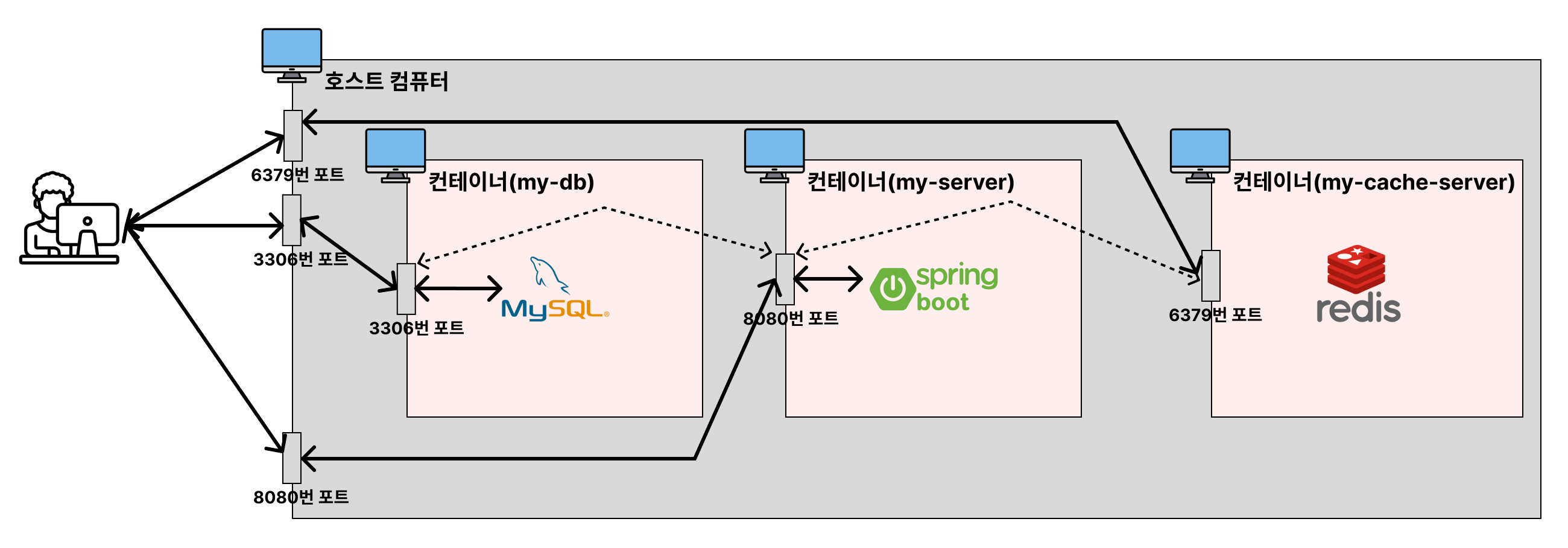
각 컨테이너는 각자의 네트워크 환경을 가지기 때문에, localhost 가 아닌 Redis 가 실행되고 있는 컨테이너로 통신해야 한다.
Redis 가 실행중인 컨테이너 주소는 compose.yml 파일에 정의한 service 이름에서 확인할 수 있다. (my-cache-server)
4) Spring Boot 프로젝트 빌드 후, compose 파일 재실행
- Windows PowerShell
PS C:\Users\admin\IdeaProjects\compose-spring-boot-server> ./gradlew clean build

BUILD SUCCESSFUL in 1s
6 actionable tasks: 6 executed
Consider enabling configuration cache to speed up this build: https://docs.gradle.org/9.5.1/userguide/configuration_cache_enabling.html
PS C:\Users\admin\IdeaProjects\compose-spring-boot-server> docker compose down
[+] down 4/4
 ✔ Container compose-spring-boot-server-my-server-1       Removed                                                                                                                                                               0.4s
 ✔ Container compose-spring-boot-server-my-cache-server-1 Removed                                                                                                                                                               0.4s
 ✔ Container compose-spring-boot-server-my-db-1           Removed                                                                                                                                                               1.6s
 ✔ Network compose-spring-boot-server_default             Removed                                                                                                                                                               0.3s
PS C:\Users\admin\IdeaProjects\compose-spring-boot-server> docker compose up --build -d
#1 [internal] load local bake definitions
#1 reading from stdin 619B 0.0s done
#1 DONE 0.0s

#2 [internal] load build definition from Dockerfile
#2 transferring dockerfile: 189B done
#2 DONE 0.0s

#3 [internal] load metadata for docker.io/library/eclipse-temurin:17-jdk
#3 DONE 0.8s

#4 [internal] load .dockerignore
#4 transferring context: 2B done
#4 DONE 0.0s

#5 [1/2] FROM docker.io/library/eclipse-temurin:17-jdk@sha256:b04a8c5d46e210873ffd1af6ad5f4d62c69ed3a6736993556eae60bba1373a23
#5 resolve docker.io/library/eclipse-temurin:17-jdk@sha256:b04a8c5d46e210873ffd1af6ad5f4d62c69ed3a6736993556eae60bba1373a23 0.0s done
#5 DONE 0.0s

#6 [internal] load build context
#6 transferring context: 65.68MB 4.9s done
#6 DONE 4.9s

#7 [2/2] COPY build/libs/*SNAPSHOT.jar /app.jar
#7 CACHED

#8 exporting to image
#8 exporting layers done
#8 exporting manifest sha256:240711d58d52a8e7324bd690d89d04e68ff397b7fdec2d3a51560941c08426c7 done
#8 exporting config sha256:777e07546b98bb9829d89de815e463d8c0c534b8c300b2876d1768952c197bf8 done
#8 exporting attestation manifest sha256:c2c1add04cf8c2202a760056a852ba46b1b7e75e165cfce77cbe76197202adb4
#8 exporting attestation manifest sha256:c2c1add04cf8c2202a760056a852ba46b1b7e75e165cfce77cbe76197202adb4 0.1s done
#8 exporting manifest list sha256:f60042522be31262488c0ed268c821ab9c8a2d51156508f84c3841de0296e726 0.0s done
#8 naming to docker.io/library/compose-spring-boot-server-my-server:latest done
#8 unpacking to docker.io/library/compose-spring-boot-server-my-server:latest
#8 unpacking to docker.io/library/compose-spring-boot-server-my-server:latest 0.3s done
#8 DONE 0.5s

#9 resolving provenance for metadata file
#9 DONE 0.0s
[+] up 5/5
 ✔ Image compose-spring-boot-server-my-server             Built                                                                                                                                                                 6.7s
 ✔ Network compose-spring-boot-server_default             Created                                                                                                                                                               0.0s
 ✔ Container compose-spring-boot-server-my-cache-server-1 Started                                                                                                                                                               0.6s
 ✔ Container compose-spring-boot-server-my-db-1           Healthy                                                                                                                                                               6.1s
 ✔ Container compose-spring-boot-server-my-server-1       Started                                                                                                                                                               6.1s

What's next:
    Filter, search, and stream logs from all your Compose services
    in one place with Docker Desktop's Logs view. docker-desktop://dashboard/logs?appId=compose-spring-boot-server
PS C:\Users\admin\IdeaProjects\compose-spring-boot-server> docker compose ps
NAME                                           IMAGE                                  COMMAND                   SERVICE           CREATED              STATUS                        PORTS
compose-spring-boot-server-my-cache-server-1   redis                                  "docker-entrypoint.s…"   my-cache-server   About a minute ago   Up About a minute (healthy)   0.0.0.0:6379->6379/tcp, [::]:6379->6379/tcp
compose-spring-boot-server-my-db-1             mysql                                  "docker-entrypoint.s…"   my-db             About a minute ago   Up About a minute (healthy)   0.0.0.0:3306->3306/tcp, [::]:3306->3306/tcp
compose-spring-boot-server-my-server-1         compose-spring-boot-server-my-server   "java -jar /app.jar"      my-server         About a minute ago   Up About a minute             0.0.0.0:8080->8080/tcp, [::]:8080->8080/tcp
5) 브라우저에서 확인
브라우저에서 http://localhost:8080/ 접속

6) 컨테이너 로그 확인
- Windows PowerShell
PS C:\Users\admin\IdeaProjects\compose-spring-boot-server> docker compose logs
my-db-1            | 2026-06-04 13:51:31+00:00 [Note] [Entrypoint]: Entrypoint script for MySQL Server 9.7.0-1.el9 started.
my-server-1        |
my-cache-server-1  | Starting Redis Server
my-db-1            | 2026-06-04 13:51:31+00:00 [Note] [Entrypoint]: Switching to dedicated user 'mysql'
my-db-1            | 2026-06-04 13:51:31+00:00 [Note] [Entrypoint]: Entrypoint script for MySQL Server 9.7.0-1.el9 started.
my-db-1            | '/var/lib/mysql/mysql.sock' -> '/var/run/mysqld/mysqld.sock'
my-db-1            | 2026-06-04T13:51:32.186941Z 0 [System] [MY-015015] [Server] MySQL Server - start.
my-db-1            | 2026-06-04T13:51:32.428815Z 0 [System] [MY-010116] [Server] /usr/sbin/mysqld (mysqld 9.7.0) starting as process 1
my-db-1            | 2026-06-04T13:51:32.428826Z 0 [System] [MY-015603] [Server] MySQL Server has access to 20 logical CPUs.
my-db-1            | 2026-06-04T13:51:32.428835Z 0 [System] [MY-015603] [Server] MySQL Server has access to 33578594304 bytes of physical memory.
my-server-1        |   .   ____          _            __ _ _
my-server-1        |  /\\ / ___'_ __ _ _(_)_ __  __ _ \ \ \ \
my-server-1        | ( ( )\___ | '_ | '_| | '_ \/ _` | \ \ \ \
my-server-1        |  \\/  ___)| |_)| | | | | || (_| |  ) ) ) )
my-server-1        |   '  |____| .__|_| |_|_| |_\__, | / / / /
my-server-1        |  =========|_|==============|___/=/_/_/_/
my-server-1        |
my-server-1        |  :: Spring Boot ::                (v4.0.6)
my-server-1        |
my-server-1        | 2026-06-04T13:51:38.337Z  INFO 1 --- [           main] c.e.c.ComposeSpringBootServerApplication : Starting ComposeSpringBootServerApplication v0.0.1-SNAPSHOT using Java 17.0.19 with PID 1 (/app.jar started by root in /)
my-server-1        | 2026-06-04T13:51:38.342Z  INFO 1 --- [           main] c.e.c.ComposeSpringBootServerApplication : No active profile set, falling back to 1 default profile: "default"
my-server-1        | 2026-06-04T13:51:38.846Z  INFO 1 --- [           main] .s.d.r.c.RepositoryConfigurationDelegate : Multiple Spring Data modules found, entering strict repository configuration mode
my-server-1        | 2026-06-04T13:51:38.848Z  INFO 1 --- [           main] .s.d.r.c.RepositoryConfigurationDelegate : Bootstrapping Spring Data JPA repositories in DEFAULT mode.
my-server-1        | 2026-06-04T13:51:38.863Z  INFO 1 --- [           main] .s.d.r.c.RepositoryConfigurationDelegate : Finished Spring Data repository scanning in 9 ms. Found 0 JPA repository interfaces.
my-server-1        | 2026-06-04T13:51:38.892Z  INFO 1 --- [           main] .s.d.r.c.RepositoryConfigurationDelegate : Multiple Spring Data modules found, entering strict repository configuration mode
my-server-1        | 2026-06-04T13:51:38.893Z  INFO 1 --- [           main] .s.d.r.c.RepositoryConfigurationDelegate : Bootstrapping Spring Data Redis repositories in DEFAULT mode.
my-server-1        | 2026-06-04T13:51:38.902Z  INFO 1 --- [           main] .s.d.r.c.RepositoryConfigurationDelegate : Finished Spring Data repository scanning in 0 ms. Found 0 Redis repository interfaces.
my-server-1        | 2026-06-04T13:51:39.331Z  INFO 1 --- [           main] o.s.boot.tomcat.TomcatWebServer          : Tomcat initialized with port 8080 (http)
my-server-1        | 2026-06-04T13:51:39.345Z  INFO 1 --- [           main] o.apache.catalina.core.StandardService   : Starting service [Tomcat]
my-server-1        | 2026-06-04T13:51:39.345Z  INFO 1 --- [           main] o.apache.catalina.core.StandardEngine    : Starting Servlet engine: [Apache Tomcat/11.0.21]
my-server-1        | 2026-06-04T13:51:39.374Z  INFO 1 --- [           main] b.w.c.s.WebApplicationContextInitializer : Root WebApplicationContext: initialization completed in 984 ms
my-server-1        | 2026-06-04T13:51:39.524Z  INFO 1 --- [           main] com.zaxxer.hikari.HikariDataSource       : HikariPool-1 - Starting...
my-server-1        | 2026-06-04T13:51:39.759Z  INFO 1 --- [           main] com.zaxxer.hikari.pool.HikariPool        : HikariPool-1 - Added connection com.mysql.cj.jdbc.ConnectionImpl@26c7b1c6
my-server-1        | 2026-06-04T13:51:39.762Z  INFO 1 --- [           main] com.zaxxer.hikari.HikariDataSource       : HikariPool-1 - Start completed.
my-server-1        | 2026-06-04T13:51:39.794Z  INFO 1 --- [           main] org.hibernate.orm.jpa                    : HHH008540: Processing PersistenceUnitInfo [name: default]
my-server-1        | 2026-06-04T13:51:39.853Z  INFO 1 --- [           main] org.hibernate.orm.core                   : HHH000001: Hibernate ORM core version 7.2.12.Final
my-server-1        | 2026-06-04T13:51:40.247Z  INFO 1 --- [           main] o.s.o.j.p.SpringPersistenceUnitInfo      : No LoadTimeWeaver setup: ignoring JPA class transformer
my-server-1        | 2026-06-04T13:51:40.338Z  INFO 1 --- [           main] org.hibernate.orm.connections.pooling    : HHH10001005: Database info:
my-server-1        |    Database JDBC URL [jdbc:mysql://my-db:3306/mydb]
my-server-1        |    Database driver: MySQL Connector/J
my-server-1        |    Database dialect: MySQLDialect
my-server-1        |    Database version: 9.7
my-server-1        |    Default catalog/schema: mydb/undefined
my-server-1        |    Autocommit mode: undefined/unknown
my-server-1        |    Isolation level: REPEATABLE_READ [default REPEATABLE_READ]
my-server-1        |    JDBC fetch size: none
my-server-1        |    Pool: DataSourceConnectionProvider
my-server-1        |    Minimum pool size: undefined/unknown
my-server-1        |    Maximum pool size: undefined/unknown
my-server-1        | 2026-06-04T13:51:40.613Z  INFO 1 --- [           main] org.hibernate.orm.core                   : HHH000489: No JTA platform available (set 'hibernate.transaction.jta.platform' to enable JTA platform integration)
my-server-1        | 2026-06-04T13:51:40.621Z  INFO 1 --- [           main] j.LocalContainerEntityManagerFactoryBean : Initialized JPA EntityManagerFactory for persistence unit 'default'
my-server-1        | 2026-06-04T13:51:40.922Z  WARN 1 --- [           main] JpaBaseConfiguration$JpaWebConfiguration : spring.jpa.open-in-view is enabled by default. Therefore, database queries may be performed during view rendering. Explicitly configure spring.jpa.open-in-view to disable this warning
my-server-1        | 2026-06-04T13:51:41.487Z  INFO 1 --- [           main] o.s.boot.tomcat.TomcatWebServer          : Tomcat started on port 8080 (http) with context path '/'
my-server-1        | 2026-06-04T13:51:41.504Z  INFO 1 --- [           main] c.e.c.ComposeSpringBootServerApplication : Started ComposeSpringBootServerApplication in 3.616 seconds (process running for 4.164)
my-server-1        | 2026-06-04T13:52:01.244Z  INFO 1 --- [nio-8080-exec-1] o.a.c.c.C.[Tomcat].[localhost].[/]       : Initializing Spring DispatcherServlet 'dispatcherServlet'
my-server-1        | 2026-06-04T13:52:01.245Z  INFO 1 --- [nio-8080-exec-1] o.s.web.servlet.DispatcherServlet        : Initializing Servlet 'dispatcherServlet'
my-server-1        | 2026-06-04T13:52:01.246Z  INFO 1 --- [nio-8080-exec-1] o.s.web.servlet.DispatcherServlet        : Completed initialization in 1 ms
my-cache-server-1  | 1:C 04 Jun 2026 13:51:31.622 * oO0OoO0OoO0Oo Redis is starting oO0OoO0OoO0Oo
my-db-1            | 2026-06-04T13:51:32.432931Z 0 [Warning] [MY-010159] [Server] Setting lower_case_table_names=2 because file system for /var/lib/mysql/ is case insensitive
my-cache-server-1  | 1:C 04 Jun 2026 13:51:31.622 * Redis version=8.6.3, bits=64, commit=00000000, modified=1, pid=1, just started
my-cache-server-1  | 1:C 04 Jun 2026 13:51:31.622 * Configuration loaded
my-cache-server-1  | 1:M 04 Jun 2026 13:51:31.622 * monotonic clock: POSIX clock_gettime
my-cache-server-1  | 1:M 04 Jun 2026 13:51:31.623 * Running mode=standalone, port=6379.
my-cache-server-1  | 1:M 04 Jun 2026 13:51:31.623 * <bf> RedisBloom version 8.6.2 (Git=unknown)
my-cache-server-1  | 1:M 04 Jun 2026 13:51:31.623 * <bf> Registering configuration options: [
my-cache-server-1  | 1:M 04 Jun 2026 13:51:31.623 * <bf>        { bf-error-rate       :      0.01 }
my-cache-server-1  | 1:M 04 Jun 2026 13:51:31.623 * <bf>        { bf-initial-size     :       100 }
my-cache-server-1  | 1:M 04 Jun 2026 13:51:31.623 * <bf>        { bf-expansion-factor :         2 }
my-cache-server-1  | 1:M 04 Jun 2026 13:51:31.623 * <bf>        { cf-bucket-size      :         2 }
my-cache-server-1  | 1:M 04 Jun 2026 13:51:31.623 * <bf>        { cf-initial-size     :      1024 }
my-cache-server-1  | 1:M 04 Jun 2026 13:51:31.623 * <bf>        { cf-max-iterations   :        20 }
my-cache-server-1  | 1:M 04 Jun 2026 13:51:31.623 * <bf>        { cf-expansion-factor :         1 }
my-cache-server-1  | 1:M 04 Jun 2026 13:51:31.623 * <bf>        { cf-max-expansions   :        32 }
my-cache-server-1  | 1:M 04 Jun 2026 13:51:31.623 * <bf> ]
my-cache-server-1  | 1:M 04 Jun 2026 13:51:31.623 * Module 'bf' loaded from /usr/local/lib/redis/modules//redisbloom.so
my-cache-server-1  | 1:M 04 Jun 2026 13:51:31.625 * <search> Redis version found by RedisSearch : 8.6.3 - oss
my-cache-server-1  | 1:M 04 Jun 2026 13:51:31.625 * <search> RediSearch version 8.6.7 (Git=3020486)
my-cache-server-1  | 1:M 04 Jun 2026 13:51:31.625 * <search> Low level api version 1 initialized successfully
my-cache-server-1  | 1:M 04 Jun 2026 13:51:31.625 * <search> gc: ON, prefix min length: 2, min word length to stem: 4, prefix max expansions: 200, query timeout (ms): 500, timeout policy: return, oom policy: return, cursor read size: 1000, cursor max idle (ms): 300000, max doctable size: 1000000, max number of search results:  1000000, default scorer: BM25STD,
my-cache-server-1  | 1:M 04 Jun 2026 13:51:31.625 * <search> Initialized thread pools!
my-cache-server-1  | 1:M 04 Jun 2026 13:51:31.625 * <search> Disabled workers threadpool of size 0
my-cache-server-1  | 1:M 04 Jun 2026 13:51:31.625 * <search> Subscribe to config changes
my-cache-server-1  | 1:M 04 Jun 2026 13:51:31.625 * <search> Subscribe to cluster slot migration events
my-cache-server-1  | 1:M 04 Jun 2026 13:51:31.625 * <search> Enabled role change notification
my-cache-server-1  | 1:M 04 Jun 2026 13:51:31.625 * <search> Cluster configuration: AUTO partitions, type: 0, coordinator timeout: 0ms
my-cache-server-1  | 1:M 04 Jun 2026 13:51:31.625 * Module 'search' loaded from /usr/local/lib/redis/modules//redisearch.so
my-cache-server-1  | 1:M 04 Jun 2026 13:51:31.625 * <timeseries> RedisTimeSeries version 80602, git_sha=5d7c61c9f861b5cb83989463595c2c9f6b2bfe63
my-cache-server-1  | 1:M 04 Jun 2026 13:51:31.625 * <timeseries> Redis version found by RedisTimeSeries : 8.6.3 - oss
my-cache-server-1  | 1:M 04 Jun 2026 13:51:31.625 * <timeseries> Registering configuration options: [
my-cache-server-1  | 1:M 04 Jun 2026 13:51:31.625 * <timeseries>        { ts-compaction-policy   :              }
my-cache-server-1  | 1:M 04 Jun 2026 13:51:31.625 * <timeseries>        { ts-num-threads         :            3 }
my-cache-server-1  | 1:M 04 Jun 2026 13:51:31.625 * <timeseries>        { ts-retention-policy    :            0 }
my-cache-server-1  | 1:M 04 Jun 2026 13:51:31.625 * <timeseries>        { ts-duplicate-policy    :        block }
my-cache-server-1  | 1:M 04 Jun 2026 13:51:31.625 * <timeseries>        { ts-chunk-size-bytes    :         4096 }
my-cache-server-1  | 1:M 04 Jun 2026 13:51:31.625 * <timeseries>        { ts-encoding            :   compressed }
my-cache-server-1  | 1:M 04 Jun 2026 13:51:31.625 * <timeseries>        { ts-ignore-max-time-diff:            0 }
my-cache-server-1  | 1:M 04 Jun 2026 13:51:31.625 * <timeseries>        { ts-ignore-max-val-diff :     0.000000 }
my-cache-server-1  | 1:M 04 Jun 2026 13:51:31.625 * <timeseries> ]
my-cache-server-1  | 1:M 04 Jun 2026 13:51:31.626 * <timeseries> Detected redis oss
my-cache-server-1  | 1:M 04 Jun 2026 13:51:31.626 * <timeseries> Subscribe to ASM events
my-cache-server-1  | 1:M 04 Jun 2026 13:51:31.626 * <timeseries> Enabled diskless replication
my-cache-server-1  | 1:M 04 Jun 2026 13:51:31.626 * Module 'timeseries' loaded from /usr/local/lib/redis/modules//redistimeseries.so
my-cache-server-1  | 1:M 04 Jun 2026 13:51:31.626 * <ReJSON> Created new data type 'ReJSON-RL'
my-cache-server-1  | 1:M 04 Jun 2026 13:51:31.626 * <ReJSON> version: 80600 git sha: unknown branch: unknown
my-cache-server-1  | 1:M 04 Jun 2026 13:51:31.626 * <ReJSON> Exported RedisJSON_V1 API
my-cache-server-1  | 1:M 04 Jun 2026 13:51:31.626 * <ReJSON> Exported RedisJSON_V2 API
my-cache-server-1  | 1:M 04 Jun 2026 13:51:31.626 * <ReJSON> Exported RedisJSON_V3 API
my-cache-server-1  | 1:M 04 Jun 2026 13:51:31.626 * <ReJSON> Exported RedisJSON_V4 API
my-cache-server-1  | 1:M 04 Jun 2026 13:51:31.626 * <ReJSON> Exported RedisJSON_V5 API
my-db-1            | 2026-06-04T13:51:32.447255Z 1 [System] [MY-013576] [InnoDB] InnoDB initialization has started.
my-db-1            | 2026-06-04T13:51:33.631036Z 1 [System] [MY-013577] [InnoDB] InnoDB initialization has ended.
my-db-1            | 2026-06-04T13:51:34.000691Z 0 [Warning] [MY-010068] [Server] CA certificate ca.pem is self signed.
my-db-1            | 2026-06-04T13:51:34.001212Z 0 [System] [MY-013602] [Server] Channel mysql_main configured to support TLS. Encrypted connections are now supported for this channel.
my-db-1            | 2026-06-04T13:51:34.020012Z 0 [Warning] [MY-011810] [Server] Insecure configuration for --pid-file: Location '/var/run/mysqld' in the path is accessible to all OS users. Consider choosing a different directory.
my-db-1            | 2026-06-04T13:51:34.076814Z 0 [System] [MY-011323] [Server] X Plugin ready for connections. Bind-address: '::' port: 33060, socket: /var/run/mysqld/mysqlx.sock
my-db-1            | 2026-06-04T13:51:34.076886Z 0 [System] [MY-010931] [Server] /usr/sbin/mysqld: ready for connections. Version: '9.7.0'  socket: '/var/run/mysqld/mysqld.sock'  port: 3306  MySQL Community Server - GPL.
my-cache-server-1  | 1:M 04 Jun 2026 13:51:31.626 * <ReJSON> Exported RedisJSON_V6 API
my-cache-server-1  | 1:M 04 Jun 2026 13:51:31.626 * <ReJSON> Enabled diskless replication
my-cache-server-1  | 1:M 04 Jun 2026 13:51:31.626 * <ReJSON> Initialized shared string cache, thread safe: true.
my-cache-server-1  | 1:M 04 Jun 2026 13:51:31.626 * Module 'ReJSON' loaded from /usr/local/lib/redis/modules//rejson.so
my-cache-server-1  | 1:M 04 Jun 2026 13:51:31.626 * <search> Acquired RedisJSON_V6 API
my-cache-server-1  | 1:M 04 Jun 2026 13:51:31.626 * Server initialized
my-cache-server-1  | 1:M 04 Jun 2026 13:51:31.626 * Ready to accept connections tcp
my-cache-server-1  | 1:M 04 Jun 2026 13:51:31.626 # WARNING: Redis does not require authentication and is not protected by network restrictions. Redis will accept connections from any IP address on any network interface.

What's next:
    Filter, search, and stream logs from all your Compose services
    in one place with Docker Desktop's Logs view. docker-desktop://dashboard/logs?appId=compose-spring-boot-server
7) compose 로 실행된 컨테이너 중지 후 삭제
- Windows PowerShell
PS C:\Users\admin\IdeaProjects\compose-spring-boot-server> docker compose down
[+] down 4/4
 ✔ Container compose-spring-boot-server-my-server-1       Removed                                                                                                                                                               0.4s
 ✔ Container compose-spring-boot-server-my-cache-server-1 Removed                                                                                                                                                               0.4s
 ✔ Container compose-spring-boot-server-my-db-1           Removed                                                                                                                                                               1.0s
 ✔ Network compose-spring-boot-server_default             Removed                                                                                                                                                               0.3s
PS C:\Users\admin\IdeaProjects\compose-spring-boot-server> docker compose ps
NAME      IMAGE     COMMAND   SERVICE   CREATED   STATUS    PORTS
PS C:\Users\admin\IdeaProjects\compose-spring-boot-server> docker ps
CONTAINER ID   IMAGE     COMMAND   CREATED   STATUS    PORTS     NAMES
3. 그림으로 이해하기
비전공자도 이해할 수 있는 Docker 입문/실전| JSCODE 박재성 - 인프런 강의
현재 평점 4.9점 수강생 14,489명인 강의를 만나보세요. 비전공자 입장에서도 쉽게 이해할 수 있고, 실전에서 바로 적용 가능한 Docker 입문/실전 강의를 만들어봤습니다! Docker 기본 개념, Spring Boot를
www.inflearn.com
'강의 실습 > 비전공자도 이해할 수 있는 Docker 입문 실전' 카테고리의 다른 글
| 컨테이너로 실행시킨 Spring Boot가 MySQL에 연결이 안 되는 이유 (3) | 2026.06.03 |
|---|---|
| [실습] Spring Boot, MySQL 컨테이너 동시에 띄워보기 (0) | 2026.06.02 |
| [실습] MySQL, Redis 컨테이너 동시에 띄워보기 (2) | 2026.06.01 |
| [실습] Docker Compose로 프론트엔드(HTML, CSS, Nginx) 실행시키기 (4) | 2026.05.31 |
| [실습] Docker Compose로 프론트엔드(Next.js) 실행시키기 (0) | 2026.05.30 |


댓글